

Importing your catalogue of In-App Purchases & Subscriptions
This sections provides details on how to ease the creation of your catalogue of Products & Plans in the Purchasely Console
If you have a lot of In-App Purchases or In-App Subscriptions to import, it becomes fastidious to remap all of them with the Purchasely Console. To ease the process, you can instead:
- fill in this CSV file
- send it to us once filled at [email protected].
=> We will import your catalogue of Products and Plans in the Purchasely Console for you.
Products & plans
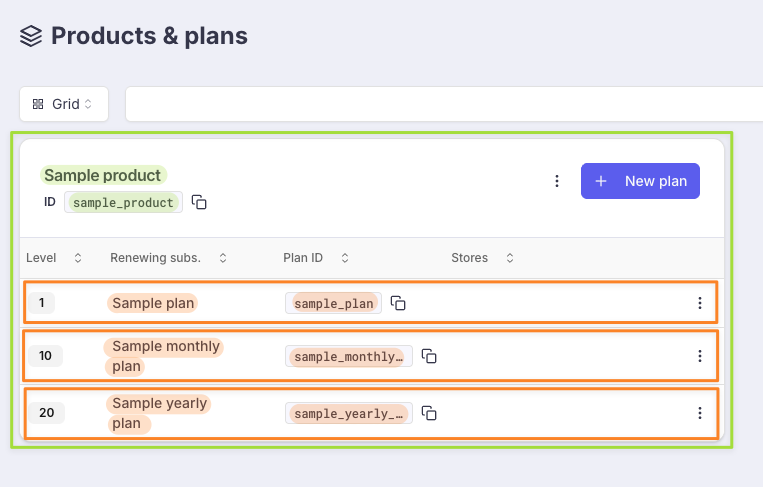
In Purchasely:
- a product (green in the screenshot) is the equivalent of an iOS "Subscription Group" or a Google "Subscription". In short, a user can only have 1 subscription at a time within the same product (which means if a user is already a subscriber to a monthly, and subscribed to a yearly in the same product, the monthly will be replaced with the yearly)
- a plan (orange in the screenshot) is the equivalent of an iOS "Subscription / In-App Purchase" or a Google "Base plan". A plan is the way to regroup 2 equivalent SKUs from Google and Apple under the same entity in Purchasely. It's particularly useful when creating a paywall: you'll be able to use the same "purchase button" for both iOS and android, and won't need to create 2 identical screens for iOS and android.
What's expected in the CSV:
Product name: this is the name that will be displayed in the Purchasely console ("Sample product" in the screenshot) and is not used anywhere else. It doesn't need to match any value from Apple or GoogleProduct id: this is the identifier that will be used by Purchasely ("sample_product" in the screenshot) when communicating with you. For example, it will be used:- in our webhooks under the property name
product(cf. server events) - when sending events to the configured integrations
- in our webhooks under the property name
Only alphanumerics characters (0-9, a-z, A-Z),
_and-are authorised
Plan name: this is the name that will be displayed in the Purchasely console ("Sample plan" in the screenshot) and is not used anywhere else. It doesn't need to match any value from Apple or GooglePlan id: this is the identifier that will be used by Purchasely ("sample_plan" in the screenshot) when communicating with you. For example, it will be used:- in our webhooks under the property name
plan(cf. server events) - when sending events to the configured integrations
- in our webhooks under the property name
Only alphanumerics characters (0-9, a-z, A-Z),
_and-are authorised
If you import multiple plans for the same product:
- all the
Product namecolumns should be equal- all the
Product idcolumns should be equal
Level: allows to define upgrade/downgrade/crossgrade policies within a Product (cf. Ordering the Plans inside a Product for more details)Type: the following values are acceptedRENEWING_SUBSCRIPTIONNON_RENEWING_SUBSCRIPTIONCONSUMABLENON_CONSUMABLE
ID Apple: it corresponds to thePRODUCT IDcolumn in the App Store Connect (screenshot bellow shows subscriptions. You can use the samePRODUCT IDcolumn for In-App Purchases)
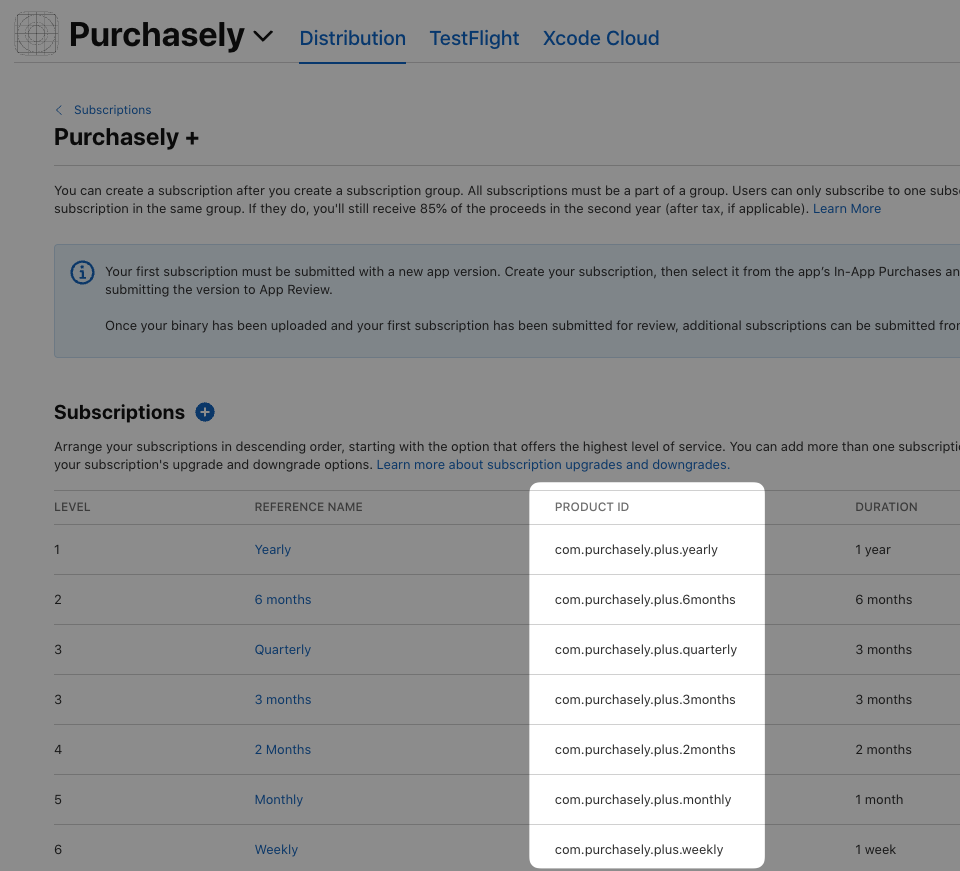
If you only want to do the import for Google subscriptions, you can leave it empty
ID Google/Base plan id Google: present in the Google Play Console
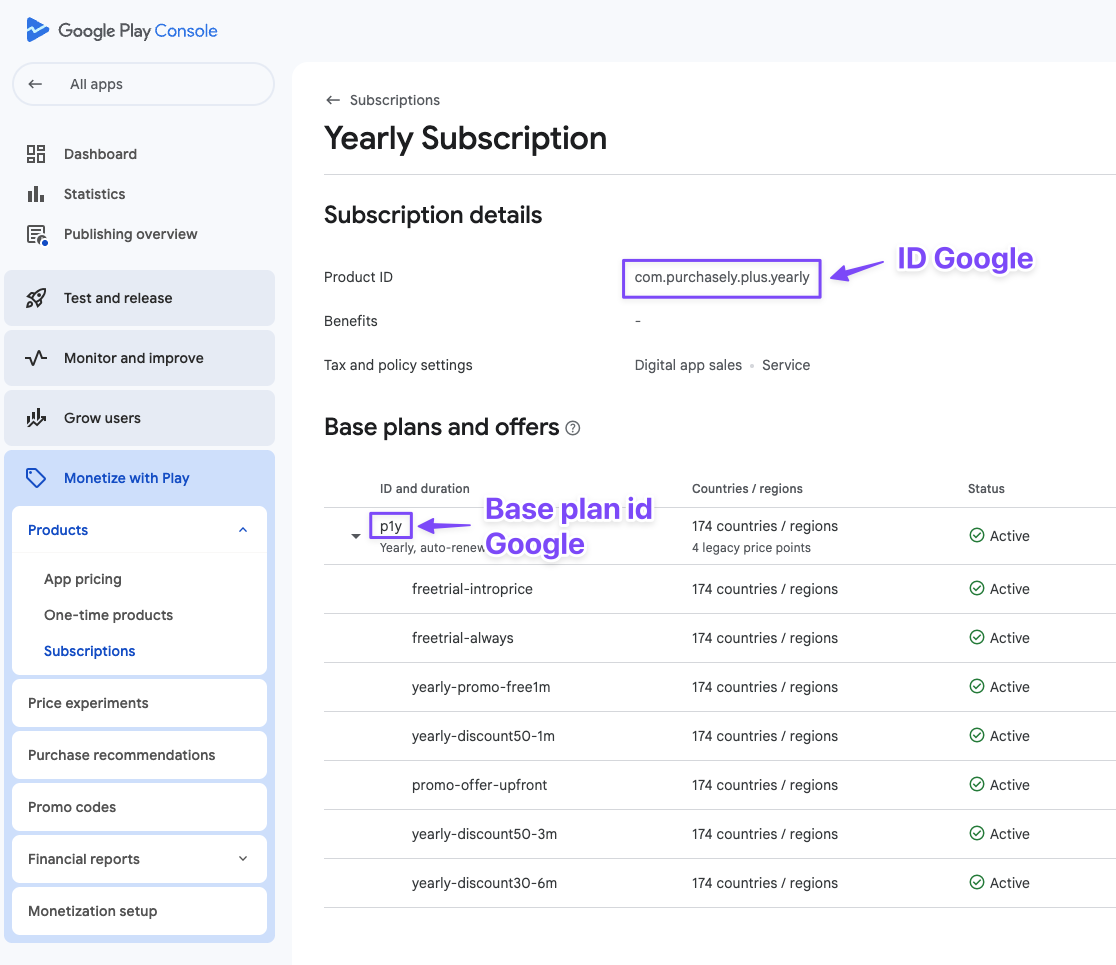
If you only want to do the import for Apple subscriptions, you can leave them empty
Periodicity: the following values are accepted (only for renewing and non renewing subscriptions)P1W: weekly subscriptionsP2W: bi-weekly subscriptionsP1M: monthly subscriptionsP2M: bi-monthly subscriptionsP3M: quarterly subscriptionsP6M: 6 months subscriptionsP1Y: yearly subscriptions
Best strategy to fill the CSV file in
- fully read the Product & plans setup doc to understand these notions
- then for iOS, organize your products/plans the same way they are configured in the store
- then for Google:
- try regrouping equivalent SKU from Apple and Google in the same plans. It will make your life easier when you'll create Purchasely paywalls
- if no equivalent SKU exists on Apple, create a new Purchasely plan in the appropriate Purchasely product (ie: in a product containing plans a user can't subscribe at the same time with your new plan
Updated 9 months ago