

observer - using the Action Interceptor
This sections provides a detailed overview of how to use the Paywall Action Interceptor to process transactions in observer Mode
What is the Action Interceptor?
The Action Interceptor allows to intercept and override every interaction the users have with a Purchasely Screen.
This can be used to:
- Intercept purchase and restore actions to perform them using your own code or another third-party SDK
- Intercept the login button tapped to display your login form
- Force the explicit acceptance of terms and conditions before a purchase
- Intercept the call to a webview to inject credentials and be directly logged in
- Block purchases in Kids category apps to add a parental permission gate
- Block direct access to external content (webview or link to Safari) in Kids category apps to add a parental permission gate
With the action interceptor, you get everything you need to:
- Get the action (purchase, login, ...) and context (Plan purchased for instance)
- Display views, errors, messages, … above the Purchasely Screens
- Choose if Purchasely should continue the action or not
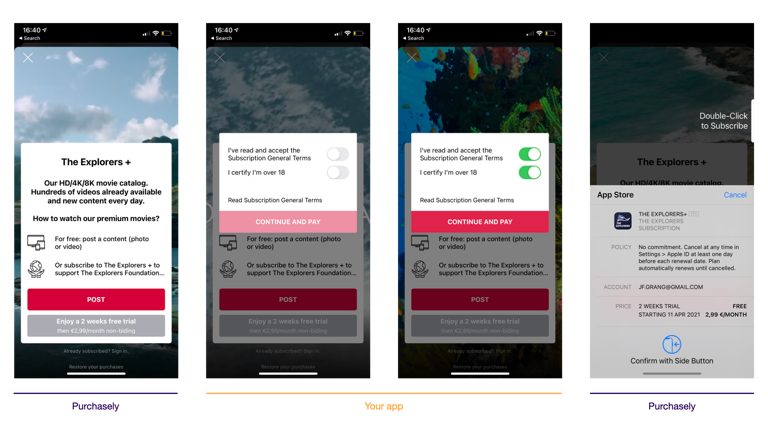
Example of use of the Action Interceptor: when a user clicks on the Purchase button, the SDK hands over to the app that displays a modal to make the user accept the T&C. The same principle is used to make the app process the transaction with an already-in-place transaction infrastructure
What Paywall Actions can be intercepted?
You can intercept the following buttons being tapped:
- Close
- Login
- Navigate (web or deeplink)
- Purchase
- Win-back / retention offer
- Restore
- Open Screen
- Open Placement
- Promo code
Overriding the open_presentation or open_placement actions is not recommended.
These actions are tightly coupled with Purchasely’s internal context. Overriding them can break the SDK’s ability to properly track A/B tests, audiences, and campaigns, leading to incorrect analytics and unexpected behavior.
Such overrides should only be considered for very specific and advanced use cases. Before implementing them, please discuss your use case with Purchasely to ensure it does not negatively impact tracking, experimentation, or campaign attribution.
Implementing the Action Interceptor
You register one interceptor per action with Purchasely.interceptAction. Each interceptor receives:
info: thePLYInterceptorInfoobject containing the controller of the paywall to dismiss it or display content / error messages above it, and the presentation id and content id associated to this paywall- the typed action object (like a native
Purchase, or Flutter'sPLYPurchasePayload, carrying a realplanobject and, on Android, a real nullablesubscriptionOfferobject) that contains the objects needed to perform the action completion(iOS) / a returnedPLYInterceptResult(Android): tells Purchasely how the action was handled. Returning the "not handled" result on a purchase action will lead the Purchasely SDK to trigger the native in-app purchase flow itself
Which result should you return after handling the action?On a
loginaction, returncompletion(.notHandled)(iOS) /PLYInterceptResult.NOT_HANDLED(Android) to refresh the paywall if the user has logged inOn a
purchaseaction, if you've successfully handled the transaction, returncompletion(.success)(iOS) /PLYInterceptResult.SUCCESS(Android) to avoid a second trigger of the native in-app purchase flow by the SDKActions you do not register an interceptor for are handled automatically by the SDK, so the button will not keep spinning.
Processing transactions with your in-house system
Here is a code sample using the Action Interceptor to process transactions with your own in-house purchase system , for the actions purchase and restore:
Purchasely.interceptAction(.purchase) { info, params, completion in
    // Grab the plan to purchase
    guard let plan = params?.plan, let appleProductId = plan.appleProductId else {
        completion(.notHandled)
        return
    }

    let success = MyPurchaseSystem.purchase(appleProductId)
    if success {
        // SDK auto-synchronizes on success in observer mode
        completion(.success) // notify Purchasely paywall to stop processing action
    } else {
        completion(.failed)
    }
}

Purchasely.interceptAction(.restore) { info, params, completion in
    MyPurchaseSystem.restorePurchases()
    // SDK auto-synchronizes on success in observer mode
    completion(.success) // notify Purchasely paywall to stop processing action
}
Purchasely.interceptAction<PLYPresentationAction.Purchase> { info, purchase ->
val subscriptionId = purchase.subscriptionOffer?.subscriptionId
val basePlanId = purchase.subscriptionOffer?.basePlanId
val offerId = purchase.subscriptionOffer?.offerId
val offerToken = purchase.subscriptionOffer?.offerToken
// you just need to pass the offerToken to BillingClient
val success = MyPurchaseSystem.purchase(offerToken)
if (success) {
// SDK auto-synchronizes on success in observer mode
PLYInterceptResult.SUCCESS // notify Purchasely paywall to stop processing action
} else {
PLYInterceptResult.FAILED
}
}
Purchasely.interceptAction<PLYPresentationAction.Restore> { info, _ ->
MyPurchaseSystem.restoreAllPurchases()
// SDK auto-synchronizes on success in observer mode
PLYInterceptResult.SUCCESS // notify Purchasely paywall to stop processing action
}
// The interceptAction<T> { … } lambda above is a suspend lambda: you RETURN the result.
// If your call site is not a coroutine (e.g. your billing system reports through a callback),
// use the Class-based overload (::class.java) and return the result via the `result` lambda:
Purchasely.interceptAction(PLYPresentationAction.Purchase::class.java) { info, action, result ->
val purchase = action as PLYPresentationAction.Purchase // not cast for you here
val offerToken = purchase.subscriptionOffer?.offerToken
MyPurchaseSystem.purchase(offerToken) { success ->
// called later from your billing callback — call result exactly once
result(if (success) PLYInterceptResult.SUCCESS else PLYInterceptResult.FAILED)
}
}// Register one interceptor per action kind; each returns 'success' | 'failed' | 'notHandled'.
Purchasely.interceptAction('purchase', async (info, payload) => {
if (payload?.kind !== 'purchase') {
return 'notHandled';
}
try {
// the store product id (sku) the user clicked on in the paywall
const storeProductId = payload.plan.productId;
if (Platform.OS === 'android') {
// Only for Android you can retrieve other information about the purchase
const basePlanId = payload.subscriptionOffer?.basePlanId;
const offerId = payload.subscriptionOffer?.offerId;
const offerToken = payload.subscriptionOffer?.offerToken;
}
const success = await MyPurchaseSystem.purchase(storeProductId);
if (success) {
// SDK auto-synchronizes on success in observer mode
return 'success'; // notify Purchasely paywall to stop processing action
}
return 'failed';
} catch (e) {
console.log(e);
return 'failed';
}
});
Purchasely.interceptAction('restore', async (info, payload) => {
try {
await MyPurchaseSystem.restorePurchases();
// SDK auto-synchronizes on success in observer mode
return 'success'; // notify Purchasely paywall to stop processing action
} catch (e) {
return 'failed';
}
});// Register one handler per action kind; each returns a PLYInterceptResult.
await Purchasely.interceptAction(
PLYPresentationActionKind.purchase,
(info, payload) async {
if (payload is! PLYPurchasePayload) {
return PLYInterceptResult.notHandled;
}
try {
//the store product id (sku) the user clicked on in the paywall
final productId = payload.plan.productId;
if (Platform.isAndroid) {
// Only for Android you can get other interesting parameters
final basePlanId = payload.subscriptionOffer?.basePlanId;
final offerId = payload.subscriptionOffer?.offerId;
final offerToken = payload.subscriptionOffer?.offerToken;
}
final success = await MyPurchaseSystem.purchase(productId);
if (success) {
// SDK auto-synchronizes on success in observer mode
return PLYInterceptResult.success;
}
return PLYInterceptResult.failed;
} catch (e) {
print(e);
return PLYInterceptResult.failed;
}
},
);
await Purchasely.interceptAction(
PLYPresentationActionKind.restore,
(info, payload) async {
try {
await MyPurchaseSystem.restoreAllPurchases();
// SDK auto-synchronizes on success in observer mode
return PLYInterceptResult.success;
} on PlatformException {
// Error restoring purchases
return PLYInterceptResult.failed;
}
},
);// Register one handler per action; each returns (or resolves to) a Purchasely.InterceptResult.
Purchasely.interceptAction(Purchasely.PresentationAction.purchase, async (info, parameters) => {
// the store product id (sku) the user clicked on in the paywall
const storeProductId = parameters.plan.productId;
try {
await MyPurchaseSystem.purchase(storeProductId);
// SDK auto-synchronizes on success in observer mode
return Purchasely.InterceptResult.success;
} catch (e) {
// Error making purchase
return Purchasely.InterceptResult.failed;
}
});
Purchasely.interceptAction(Purchasely.PresentationAction.restore, async (info, parameters) => {
try {
await MyPurchaseSystem.restoreTransactions();
// SDK auto-synchronizes on success in observer mode
return Purchasely.InterceptResult.success;
} catch (e) {
// Error restoring purchases
return Purchasely.InterceptResult.failed;
}
});
You don't need to callsynchronize()yourself hereWhen your interceptor returns the success result for a purchase or restore in observer mode, the Purchasely SDK calls
synchronize()automatically to observe the transaction (fetch the receipt and pass it to the Purchasely Platform without interfering with it). Callsynchronize()manually only for transactions completed outside the interceptor — see your platform page's "synchronize() with callbacks" section.
Processing transaction with RevenueCat
Here is a code sample using the Action Interceptor to process transactions with RevenueCat , for the actions purchase and restore:
Purchasely.interceptAction(.purchase) { info, params, completion in
    // Grab the plan to purchase
    guard let plan = params?.plan, let appleProductId = plan.appleProductId else {
        completion(.notHandled)
        return
    }

    Purchases.shared.getOfferings { (offerings, error) in
        if let packages = offerings?.current?.availablePackages {
            if let package = packages.first(where: { $0.storeProduct.productIdentifier == appleProductId }) {
                Purchases.shared.purchase(package: package) { (transaction, customerInfo, error, userCancelled) in
                    /** IMPORTANT for Purchasely **/
                    // SDK auto-synchronizes on success in observer mode
                    // notify Purchasely paywall to stop processing action
                    completion(.success)

                    if customerInfo.entitlements["your_entitlement_id"]?.isActive == true {
                        // Unlock that great "pro" content
                    }
                }
            }
        }
    }
}

Purchasely.interceptAction(.restore) { info, params, completion in
    Purchases.shared.restorePurchases { customerInfo, error in
        /** IMPORTANT for Purchasely **/
        // SDK auto-synchronizes on success in observer mode
        // notify Purchasely paywall to stop processing action
        completion(.success)
    }
}
Purchasely.interceptAction<PLYPresentationAction.Purchase> { info, purchase ->
val subscriptionId = purchase.subscriptionOffer?.subscriptionId
val basePlanId = purchase.subscriptionOffer?.basePlanId
val offerId = purchase.subscriptionOffer?.offerId
val offerToken = purchase.subscriptionOffer?.offerToken
//get RevenueCat package
Purchases.sharedInstance.getOfferingsWith({ error ->
// An error occurred
}) { offerings ->
offerings.current
?.availablePackages
?.takeUnless { it.isNullOrEmpty() }
?.let { list ->
val rcPackage = list.firstOrNull { it.product.sku == subscriptionId }
Purchases.sharedInstance.purchasePackage(
this,
rcPackage,
onError = { error, userCancelled ->
/* No purchase */
},
onSuccess = { product, customerInfo ->
if (customerInfo.entitlements["my_entitlement_identifier"]?.isActive == true) {
// Unlock that content
// SDK auto-synchronizes on success in observer mode
}
})
}
}
PLYInterceptResult.SUCCESS // notify Purchasely paywall to stop processing action
}
Purchasely.interceptAction<PLYPresentationAction.Restore> { info, _ ->
// restore purchases with RevenueCat
Purchases.sharedInstance.restorePurchases(::showError) { customerInfo ->
//... check customerInfo to see if entitlement is now active
// SDK auto-synchronizes on success in observer mode
}
PLYInterceptResult.SUCCESS // notify Purchasely paywall to stop processing action
}// Register one interceptor per action kind; each returns 'success' | 'failed' | 'notHandled'.
Purchasely.interceptAction('purchase', async (info, payload) => {
if (payload?.kind !== 'purchase') {
return 'notHandled';
}
try {
// the store product id (sku) the user clicked on in the paywall
const storeProductId = payload.plan.productId;
if (Platform.OS === 'android') {
// Only for Android you can retrieve other information about the purchase
const basePlanId = payload.subscriptionOffer?.basePlanId;
const offerId = payload.subscriptionOffer?.offerId;
const offerToken = payload.subscriptionOffer?.offerToken;
}
const offerings = await Purchases.getOfferings();
if (offerings.current !== null && offerings.current.availablePackages.length !== 0) {
// get your package
const package = offerings.current.monthly;
// and purchase with RevenueCat
const { customerInfo, productIdentifier } = await Purchases.purchasePackage(package);
if (typeof customerInfo.entitlements.active.my_entitlement_identifier !== 'undefined') {
// SDK auto-synchronizes on success in observer mode
}
return 'success'; // notify Purchasely paywall to stop processing action
}
return 'failed';
} catch (e) {
console.log(e);
return 'failed';
}
});
Purchasely.interceptAction('restore', async (info, payload) => {
try {
await Purchases.restorePurchases();
// ... check restored purchaserInfo to see if entitlement is now active
// SDK auto-synchronizes on success in observer mode
return 'success'; // notify Purchasely paywall to stop processing action
} catch (e) {
return 'failed';
}
});// Register one handler per action kind; each returns a PLYInterceptResult.
await Purchasely.interceptAction(
PLYPresentationActionKind.purchase,
(info, payload) async {
if (payload is! PLYPurchasePayload) {
return PLYInterceptResult.notHandled;
}
try {
//the store product id (sku) the user clicked on in the paywall
final productId = payload.plan.productId;
if (Platform.isAndroid) {
// Only for Android you can get other interesting parameters
final basePlanId = payload.subscriptionOffer?.basePlanId;
final offerId = payload.subscriptionOffer?.offerId;
final offerToken = payload.subscriptionOffer?.offerToken;
}
Offerings offerings = await Purchases.getOfferings();
if (offerings.current != null && offerings.current.monthly != null) {
//get your product from revenuecat
Product product = offerings.current.monthly.product;
//start purchase
PurchaserInfo purchaserInfo = await Purchases.purchasePackage(product);
if (purchaserInfo.entitlements.all["my_entitlement_identifier"].isActive) {
// SDK auto-synchronizes on success in observer mode
}
return PLYInterceptResult.success;
}
return PLYInterceptResult.failed;
} catch (e) {
print(e);
return PLYInterceptResult.failed;
}
},
);
await Purchasely.interceptAction(
PLYPresentationActionKind.restore,
(info, payload) async {
try {
PurchaserInfo restoredInfo = await Purchases.restoreTransactions();
// ... check restored purchaserInfo to see if entitlement is now active
// SDK auto-synchronizes on success in observer mode
return PLYInterceptResult.success;
} on PlatformException {
// Error restoring purchases
return PLYInterceptResult.failed;
}
},
);Purchasely.interceptAction(Purchasely.PresentationAction.purchase, async (info, parameters) => {
// the store product id (sku) the user clicked on in the paywall
const storeProductId = parameters.plan.productId;
try {
const offerings = await Purchases.getOfferings();
if (offerings.current && offerings.current.monthly) {
// get your package from RevenueCat
const packageToBuy = offerings.current.monthly;
const { purchaserInfo } = await Purchases.purchasePackage(packageToBuy);
if (typeof purchaserInfo.entitlements.active.my_entitlement_identifier !== 'undefined') {
// SDK auto-synchronizes on success in observer mode
}
}
return Purchasely.InterceptResult.success;
} catch (e) {
// Error making purchase
return Purchasely.InterceptResult.failed;
}
});
Purchasely.interceptAction(Purchasely.PresentationAction.restore, async (info, parameters) => {
try {
await Purchases.restoreTransactions();
// SDK auto-synchronizes on success in observer mode
return Purchasely.InterceptResult.success;
} catch (e) {
// Error restoring purchases
return Purchasely.InterceptResult.failed;
}
});More details on the Action Interceptor and how to intercept of types of actions
Updated 3 months ago