

Webhook
Receive real-time server events about your subscribers' lifecycle
Purchasely can send real-time Server Events to your backend via a webhook. These events cover every stage of the subscription lifecycle — from activation to renewal, plan changes, billing issues, and churn.
This page explains how to configure and implement the webhook to receive Lifecycle Events, Offer Events and Transactional Events.
Looking for entitlement management?If you want to use the webhook to manage user entitlements (
ACTIVATE/DEACTIVATEevents), refer to the dedicated guide: Backend Entitlements.
Benefits
Receiving server events on your backend unlocks several capabilities:
- Marketing automations — Trigger campaigns based on lifecycle milestones (e.g. send a win-back email when
RENEWAL_DISABLEDfires, or a congratulations message onTRIAL_CONVERTED) - Data pipeline — Feed your data warehouse, BI tools or analytics platforms with granular subscription data for cohort analysis, churn prediction and LTV modeling
- Internal tooling — Power customer support dashboards with real-time subscription status, billing issue alerts and transaction history
- Revenue tracking — Use
TRANSACTION_PROCESSEDevents to reconcile revenue across stores and currencies in your own systems - Server Event forwarding — If you rely on a 3rd party platform which is not natively supported by Purchasely, you can leverage the webhook to receive the events and forward them directly to your 3rd-party platform directly from your backend
Configuration
Setting up the webhook requires two steps in the Purchasely Console under [YOUR APP] > Settings > Webhooks.
1. Set your endpoint URL
Enter your Client webhook URL — this is the HTTPS endpoint on your backend that will receive the events.
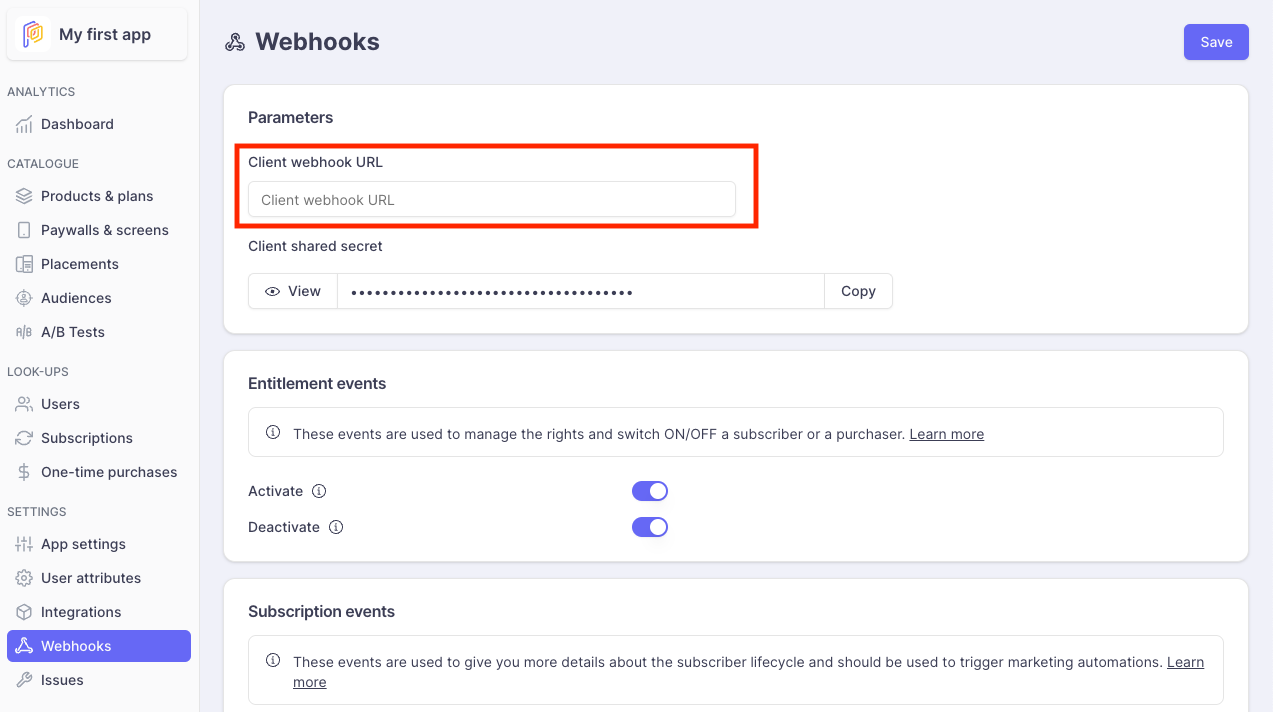
2. Enable Subscription Events
Scroll down to the Subscription events section. Here you can toggle individual events on or off depending on your needs.
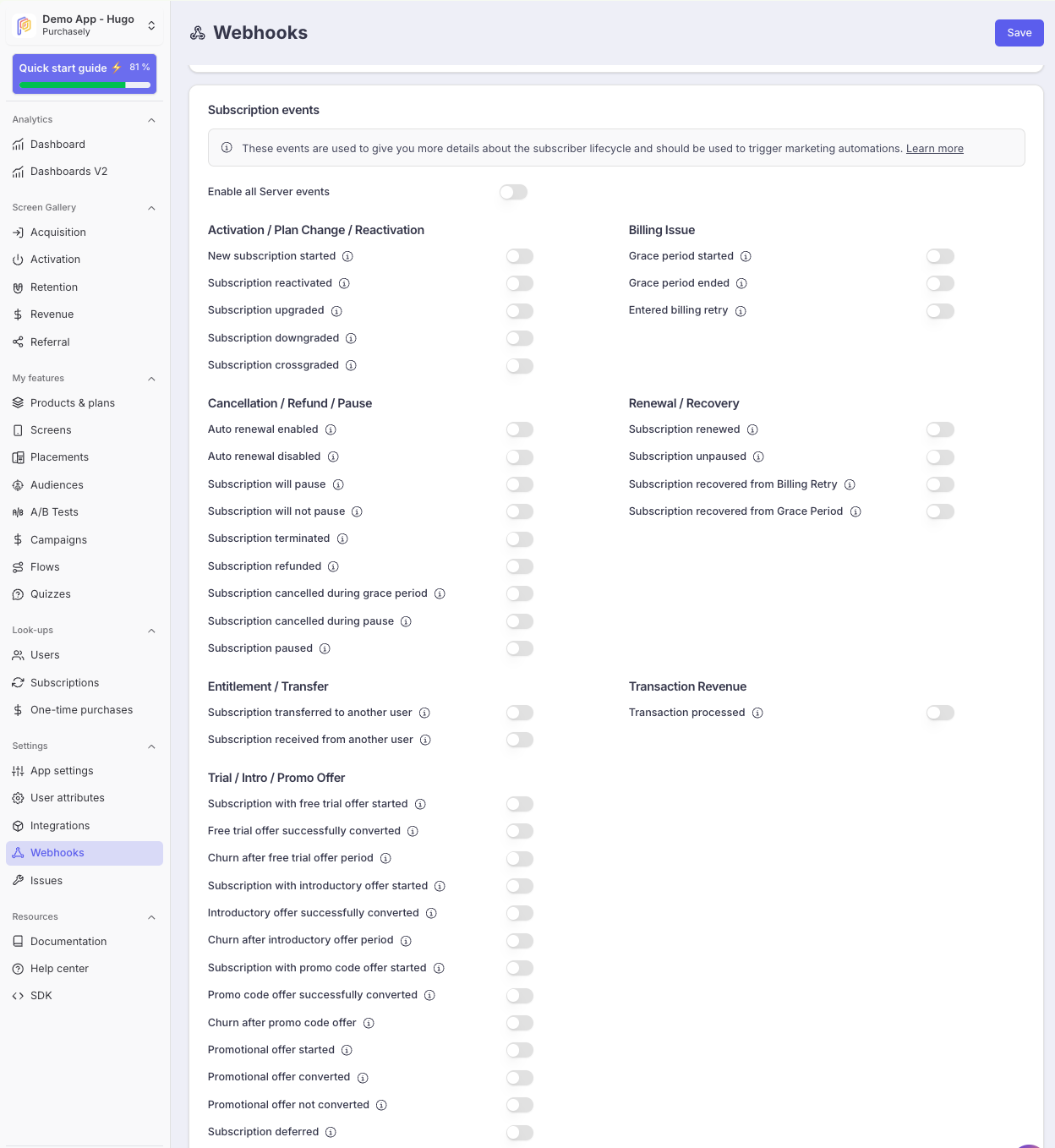
Events are organized by category:
| Category | Examples | Use case |
|---|---|---|
| Activation / Plan Change / Reactivation | SUBSCRIPTION_STARTED, SUBSCRIPTION_UPGRADED, SUBSCRIPTION_REACTIVATED | Track new subscribers, plan changes and win-backs |
| Cancellation / Refund / Pause | RENEWAL_DISABLED, SUBSCRIPTION_TERMINATED, SUBSCRIPTION_REFUNDED | Detect voluntary and involuntary churn signals |
| Billing Issue | GRACE_PERIOD_STARTED, ENTERED_BILLING_RETRY | Monitor and react to payment failures |
| Renewal / Recovery | SUBSCRIPTION_RENEWED, SUBSCRIPTION_RECOVERED_FROM_BILLING_RETRY | Track successful renewals and billing recoveries |
| Entitlement / Transfer | SUBSCRIPTION_TRANSFERRED, SUBSCRIPTION_RECEIVED | Handle multi-device subscription transfers |
| Trial / Intro / Promo Offer | TRIAL_STARTED, INTRO_OFFER_CONVERTED, PROMOTIONAL_OFFER_NOT_CONVERTED | Measure offer performance and trigger conversion campaigns |
| Transaction Revenue | TRANSACTION_PROCESSED | Track revenue per transaction with currency and amount details |
For a complete list and description of each event, see:
Event acknowledgement expectedAs soon as you have configured a Client webhook URL, the Purchasely Platform will expect an acknowledgement for all events sent on the webhook.
You can start by implementing a simple
HTTP 200response for every message sent on the webhook.
Implementation
1. Receive and acknowledge events
Your endpoint will receive POST requests with a JSON payload for each event. The most important rule: always return HTTP 200 to acknowledge the event.
Upon the reception of an event, you MUST return a HTTP 200 to confirm to the Purchasely Platform that your backend has successfully handled the event.
Return (almost) always a200response.If you don't, the Purchasely Platform will continue sending you the message following our retry strategy. This table contains approximate retry waiting times:
# Next retry backoff Total waiting time 1 0d 0h 0m 20s 0d 0h 0m 20s 2 0d 0h 0m 26s 0d 0h 0m 46s 3 0d 0h 0m 46s 0d 0h 1m 32s 4 0d 0h 1m 56s 0d 0h 3m 28s 5 0d 0h 4m 56s 0d 0h 8m 24s 6 0d 0h 11m 10s 0d 0h 19m 34s 7 0d 0h 22m 26s 0d 0h 42m 0s 8 0d 0h 40m 56s 0d 1h 22m 56s 9 0d 1h 9m 16s 0d 2h 32m 12s 10 0d 1h 50m 26s 0d 4h 22m 38s 11 0d 2h 47m 50s 0d 7h 10m 28s 12 0d 4h 5m 16s 0d 11h 15m 44s 13 0d 5h 46m 56s 0d 17h 2m 40s 14 0d 7h 57m 26s 1d 1h 0m 6s 15 0d 10h 41m 46s 1d 11h 41m 52s 16 0d 14h 5m 20s 2d 1h 47m 12s 17 0d 18h 13m 56s 2d 20h 1m 8s 18 0d 23h 13m 46s 3d 19h 14m 54s 19 1d 5h 11m 26s 5d 0h 26m 20s 20 1d 12h 13m 56s 6d 12h 40m 16s 21 1d 20h 28m 40s 8d 9h 8m 56s 22 2d 6h 3m 26s 10d 15h 12m 22s 23 2d 17h 6m 26s 13d 8h 18m 48s 24 3d 5h 46m 16s 16d 14h 5m 4s 25 3d 20h 11m 56s 20d 10h 17m 0s Any other response code than
HTTP 200will generate a retry.
Not returning a200will pause subsequent webhooks for the user.To ensure webhooks are always sent in the correct order (otherwise an
ACTIVATE/DEACTIVATEcould become aDEACTIVATE/ACTIVATE, causing unintended access for your user), we will not send any subsequent webhooks for the affected user until the first one succeeds on your end (ie: until we receive a200response).Once the first webhook succeeds, any paused webhooks will be sent immediately, maintaining the correct order.
Anonymous usersSometimes you way receive webhooks targeting an Anonymous User, even if you're not supposed to have one.
In this case, just return a
200response and ignore the content of the webhook. When the user logs in, the subscription will be automatically associated with them, and you’ll receive the corresponding webhook.If you don’t return a
200response, we’ll keep sending the anonymous user’s webhook, and you’ll never receive the one for the connected user (because we want to guarantee the order of webhooks, as explained before).
2. Route events based on event_name
event_nameEach payload includes an event_name field that identifies the event type. Use it to route the event to the appropriate handler in your backend.
const express = require('express');
const app = express();
app.use(express.json());

app.post('/purchasely/webhook', (req, res) => {
  const event = req.body;

  switch (event.event_name) {
    // Lifecycle events
    case 'SUBSCRIPTION_STARTED':
    case 'SUBSCRIPTION_RENEWED':
    case 'SUBSCRIPTION_TERMINATED':
    case 'RENEWAL_DISABLED':
      handleLifecycleEvent(event);
      break;

    // Offer events
    case 'TRIAL_STARTED':
    case 'TRIAL_CONVERTED':
    case 'TRIAL_NOT_CONVERTED':
      handleOfferEvent(event);
      break;

    // Transaction event
    case 'TRANSACTION_PROCESSED':
      handleTransactionEvent(event);
      break;

    // Entitlement events (see Backend Entitlements guide)
    case 'ACTIVATE':
    case 'DEACTIVATE':
      handleEntitlementEvent(event);
      break;

    default:
      console.log(`Unhandled event: ${event.event_name}`);
  }

  // Always acknowledge
  res.status(200).send('OK');
});
# Uses Sinatra
post '/purchasely/webhook' do
payload = JSON.parse(request.body.read)
case payload['event_name']
when 'SUBSCRIPTION_STARTED', 'SUBSCRIPTION_RENEWED',
'SUBSCRIPTION_TERMINATED', 'RENEWAL_DISABLED'
handle_lifecycle_event(payload)
when 'TRIAL_STARTED', 'TRIAL_CONVERTED', 'TRIAL_NOT_CONVERTED'
handle_offer_event(payload)
when 'TRANSACTION_PROCESSED'
handle_transaction_event(payload)
when 'ACTIVATE', 'DEACTIVATE'
handle_entitlement_event(payload) # See Backend Entitlements guide
else
puts "Unhandled event: #{payload['event_name']}"
end
# Always acknowledge
status 200
body 'OK'
end3. Extract relevant data from the payload
All server events share a common JSON structure. Key fields include:
| Field | Description |
|---|---|
event_name | Event identifier (e.g. SUBSCRIPTION_RENEWED) |
event_id | Unique event ID — use it for idempotency |
user_id | Logged-in user identifier |
anonymous_user_id | Identifier for users who haven't logged in yet |
plan | The Purchasely plan identifier |
store | The originating store (APPLE_APP_STORE, GOOGLE_PLAY_STORE, etc.) |
subscription_status | Current status of the subscription |
purchased_at | Original purchase date |
next_renewal_at | Next expected renewal date |
event_created_at | Timestamp of the event |
For TRANSACTION_PROCESSED events, additional revenue fields are provided (amount_in_customer_currency, customer_currency, plan_price_in_customer_currency, etc.).
For the full payload reference, see Server Events Attributes.
4. Authenticate messages (recommended)
We strongly recommend verifying webhook signatures to protect your endpoint against spoofed requests.
The authentication information is contained in the HEADER of the HTTP request :
X-PURCHASELY-REQUEST-SIGNATURE: request signatureX-PURCHASELY-TIMESTAMP: request timestamp
⚠️ Depending on your framework, you may receive the headers under another format:
- Ruby on Rails:
HTTP_X_PURCHASELY_REQUEST_SIGNATURE - NestJS:
x-purchasely-request-signature
⚠️ Do not use the deprecated X-PURCHASELY-SIGNATURE header
Sample codes for signature verification:
const crypto = require("crypto");

// Request headers
// ---------------
const xPurchaselyRequestSignature = "f3c2a452e9ea72f41107321aeaf7999f1054148866a710c9b23f9f501785e2a4";
const xPurchaselyTimestamp = "1698322022";

// Request body
// ------------
// Please use the raw body and not an already parsed body.
// For example with Node:
//      DO: req.rawBody.toString()
//   DON'T: JSON.stringify(req.body)
const body = "{\"a_random_key\":\"a_random_value_ad\"}";

// Signature verification
// ----------------------
const webhookSharedSecret = "foobar";
const dataToSign = xPurchaselyTimestamp + body;
const computedSignature = crypto
                          .createHmac("sha256", webhookSharedSecret)
                          .update(dataToSign)
                          .digest("hex");

if (computedSignature === xPurchaselySignature) {
  // request authenticated
}
require 'openssl'
# Request headers
# ---------------
x_purchasely_signature = "f3c2a452e9ea72f41107321aeaf7999f1054148866a710c9b23f9f501785e2a4"
x_purchasely_timestamp = "1698322022"
# Request body
# ------------
# Please use the raw body and not an already parsed body.
# For example with Ruby on Rails: request.raw_post
body = "{\"a_random_key\":\"a_random_value_ad\"}"
# Signature verification
# ----------------------
webhook_shared_secret = "foobar"
data_to_sign = x_purchasely_timestamp + body
computed_signature = OpenSSL::HMAC.hexdigest('sha256', webhook_shared_secret, data_to_sign)
if (computed_signature == x_purchasely_signature) {
# request authenticated
}// Imports
// -------
import javax.crypto.Mac
import javax.crypto.spec.SecretKeySpec
// Request headers
// ---------------
val xPurchaselySignature = "f3c2a452e9ea72f41107321aeaf7999f1054148866a710c9b23f9f501785e2a4"
val xPurchaselyTimestamp = "1698322022"
// Request body
// ------------
// Please use the raw body and not an already parsed body.
val body = "{\"a_random_key\":\"a_random_value_ad\"}"
// Signature verification
// ----------------------
val webhookSharedSecret = "foobar"
val dataToSign = xPurchaselyTimestamp + body
val hmac = Mac.getInstance("HmacSHA256")
hmac.init(SecretKeySpec(webhookSharedSecret.toByteArray(), "HmacSHA256"))
val computedSignature = hmac.doFinal(dataToSign.toByteArray()).joinToString("") { "%02x".format(it) }
if (computedSignature == xPurchaselySignature) {
// request authenticated
}You can also compute the difference between the current timestamp and the received timestamp, then decide if the difference is within your tolerance.
For more details, see Webhook Messages Authentication.
Updated 2 months ago