

Measuring the Impact of In-App Experiences
A practical guide for product and growth teams on how to measure leading KPIs in the Console, export exposure data to your analytics stack, and prove business impact on lagging KPIs.
Measuring the Impact of In-App Experiences
This guide explains how product and growth teams can leverage Purchasely to run experiments on native in-app experiences, measure their direct performance, and prove their business impact over time.
It covers the full measurement framework: what you can track natively in the Purchasely Console (leading KPIs), what requires analysis in your own data stack (lagging KPIs), and the mechanisms Purchasely provides to bridge the two.
What Purchasely enables you to do
Purchasely is an in-app experience platform that empowers product and growth teams to design, deploy, and optimize native in-app experiences without requiring app releases or developer involvement.
At its core, Purchasely provides three interconnected capabilities.
No-Code Screen and Flow Composer
The Screen Composer is a visual editor that lets you build fully native screens rendered by the Purchasely SDK. These screens are not webviews — they are native components that adapt to the device, support dark mode, localization, and match your brand guidelines.
Beyond single screens, the Flow Composer lets you chain sequences of screens into multi-step user journeys (onboarding quizzes, progressive profiling, feature tours) with branching logic based on user responses.
Audience Targeting and Personalization
Audiences are user segments letting you to target users with specific In-App Experiences. There are 2 types of Audiences:
- Rule-based Audiences are defined by combining user attributes (built-in or custom) with boolean operators.
- Custom Audiences are lists of users that can be synchronized from your Data Platform or CRM platform through an API.
Once defined, Audiences can be mapped to specific Screens or Flows within a Placement, enabling hyper-personalization of the In-App Experience.
A returning user who completed onboarding sees a different experience than a first-time visitor — all configured from the Console with no code change.
A/B Testing and Experimentation
Every Placement supports A/B testing natively. You can test different Screens, different Flows, or even different content within the same screen structure.
Purchasely uses a deterministic bucketing algorithm based on a hash of the user ID, ensuring consistent variant assignment across sessions. The platform computes statistical significance using a Bayesian method (p-value < 0.05 threshold) and displays results directly in the Console.
Key concept: PlacementsA Placement represents a specific location in your user journey (Onboarding, Settings, Home, Feature Discovery, etc.). It is the bridge between your app code and the Purchasely Console. Once a Placement is integrated, the experience it delivers can be changed, A/B tested, and personalized — all from the Console, without any app update.
What you can measure directly in the Purchasely Console
Purchasely captures a rich set of UI/SDK events and Custom Events that power the analytics dashboards in the Console. These are your leading KPIs: direct, immediate, and actionable metrics measured at the level of each experience or experiment.
Experience-Level Metrics
| Category | KPI | How it works |
|---|---|---|
| Reach | Impressions | Count of PRESENTATION_VIEWED events fired each time a Screen is displayed to a user |
| Reach | Unique Viewers | Deduplicated count of distinct users who saw the experience |
| Engagement | CTA Click Rate | Percentage of viewers who tapped the primary call-to-action button |
| Engagement | Dismiss Rate | Percentage of users who closed the experience without engaging |
| Conversion | Conversion Rate | Percentage of users who completed the target action, measured via Custom Events |
| Conversion | A/B Test Uplift | Performance delta between variants on the primary metric, with Bayesian statistical significance |
Flow Analytics
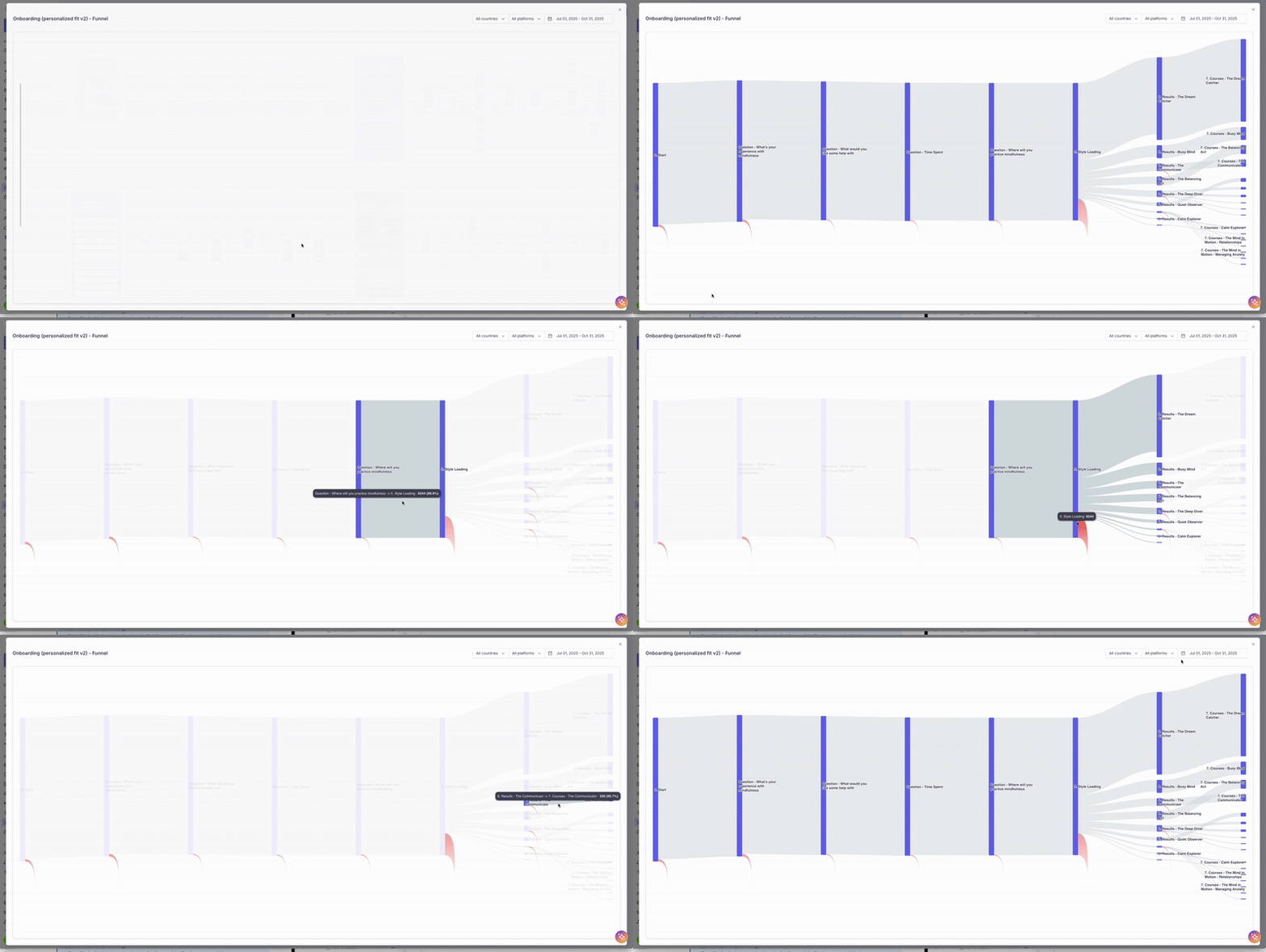
For multi-step journeys built with the Flow Composer, the Console provides a dedicated Sankey diagram dashboard. This visualization maps the entire user journey from entry to exit, showing:
- Completion rates at each step
- Drop-off points between screens
- The paths users actually follow versus the paths you designed
- A conversion KPI measuring the percentage of users who reach the desired outcome of the flow
A/B Test Results Dashboard
When an A/B test is active on a Placement, the Console displays a dedicated results view comparing variants side by side. For each variant, you see:
- Unique viewers
- Conversion rates on leading KPIs (CTA clicks, Custom Event conversions)
- Statistical significance (Bayesian, highlighted in green when p-value < 0.05)
- The winning variant recommendation
Custom Events as Conversion Metrics
Custom Events are events fired by your app in response to user actions that matter to your business. Examples include ARTICLE_SHARED, FEATURE_ACTIVATED, PROFILE_COMPLETED, NEWSLETTER_SUBSCRIBED, or any action you define.
These events serve two purposes in Purchasely:
- Triggering events — to launch an experience at the right moment in the user journey
- Conversion events — to measure whether the experience achieved its goal
What the Console shows youAll leading KPIs are displayed natively in the Purchasely Console. You do not need any external tool to track impressions, click-through rates, funnel completion, A/B test uplift, or Custom Event conversions. This is the operational dashboard your team uses day to day to iterate on experiments.
What the Console does not measure: lagging KPIs
Lagging KPIs are business-outcome metrics that reflect the cumulative impact of your experiments over weeks or months. They are the indicators you report to your management to prove the ROI of your in-app experience program.
Some lagging KPIs can be inferred from SDK events: retention (D7, D14, D30) and session frequency can be derived from APP_STARTED events that Purchasely already captures.
However, revenue metrics such as ARPU, LTV, and average order value require data that lives in your own systems (payment processors, backend databases, data warehouse).
Important distinctionPurchasely does not replace your analytics stack. It complements it by providing the experimentation layer (which users saw what, in which variant) and the leading KPI measurement. The lagging KPI analysis happens in your own data platform, using the exposure data that Purchasely provides.
How to measure lagging KPIs: the Global Holdout Group
The industry-standard method to prove the incremental impact of an in-app experience program on lagging KPIs is the Global Holdout Group (also called a Global Control Group).
The principle is straightforward:
- Reserve 5-10% of your user base that will never be exposed to any Purchasely experience
- Expose the remaining 90-95% normally to campaigns and experiments
- Compare lagging KPIs (retention, engagement, conversions, revenue) between the two populations over time
- The statistically significant difference is the proof of incremental impact
This is the same methodology used by Braze, CleverTap, and Airship to demonstrate the business value of their engagement programs. Purchasely supports this natively through its audience and experiment assignment mechanisms.
Recommended durationRun the holdout comparison for a minimum of 3 months to gather sufficient data for statistically significant results.
How to get Purchasely data into your analytics stack
For lagging KPI analysis, your data team needs to know which users were exposed to which experiments and variants. Purchasely provides three complementary mechanisms to export this data.
Experiment Exposure Events
The Purchasely SDK emits two standardized events following the existing naming convention (ENTITY_PAST_PARTICIPLE):
| Event | Description |
|---|---|
EXPERIMENT_ASSIGNED | Fired when a user is bucketed into a variant (including holdout). This is the assignment event. It carries experiment_id, variant_id, variant_name, and assignment_type (variant, control, or holdout). This event enables intent-to-treat analysis. |
EXPERIMENT_VIEWED | Fired when the user actually sees the experience on screen. Same payload as EXPERIMENT_ASSIGNED plus placement_id. This event enables per-protocol analysis and is the basis for exposure-based segmentation. |
These two events serve different analytical purposes:
- EXPERIMENT_ASSIGNED captures the moment of randomization. Use it when you want to analyze all users who were intended to see an experience, regardless of whether they actually saw it. This avoids selection bias.
- EXPERIMENT_VIEWED captures actual exposure. Use it when you want to analyze only users who were actually exposed to the experience.
Data Export Channels
These events (along with all UI/SDK events and Custom Events) can reach your data platform through four channels:
1. UI / SDK event listener
This Event Listener / delegate lets you intercept UI / SDK events when their are emitted by the SDK and to forward them directly from the app to your desired analytics / CRM platform.
2. Server-side Webhooks
All SDK events and Custom Events are forwarded in real time via the Purchasely webhook infrastructure. Your backend receives a JSON payload for each event, which can be ingested directly into your data warehouse (BigQuery, Snowflake, Redshift).
3. Native Integrations
Purchasely has built-in integrations with Amplitude, Mixpanel, Segment, Braze, and other platforms. Events are pushed directly to these tools, enriched with experiment assignment attributes, so your analysts can segment and analyze without additional pipeline work.
4. User Properties
Persistent attributes are maintained on each user profile (holdout group membership, active experiment assignments, variant IDs). These properties are synced to your CRM and analytics tools via the same integration channels, enabling cohort-based analysis at any time.
Practical exampleA news app runs an A/B test on its Article Discovery screen. Variant A shows editorial picks; Variant B shows personalized recommendations.
In the Purchasely Console: the team measures impressions, CTR, and
ARTICLE_READ(Custom Event) directly — these are leading KPIs.In Amplitude: the
EXPERIMENT_ASSIGNEDandEXPERIMENT_VIEWEDevents flow via the native integration. The data team segments users by variant and compares D30 retention and articles-per-session to measure downstream business impact — these are lagging KPIs.
What Purchasely does not do
Transparency about boundaries is essential. Here is what falls outside the scope of the Purchasely platform:
-
Revenue attribution — Purchasely does not have access to your transaction data (unless you send purchase events as Custom Events). Revenue metrics like ARPU, LTV, and AOV must be computed in your own analytics stack by joining exposure data with your payment data.
-
Full analytics replacement — Purchasely is not a general-purpose analytics platform. It does not replace Amplitude, Mixpanel, or your data warehouse. It provides the experimentation and in-app experience layer that feeds into your existing analytics infrastructure.
-
Web or cross-platform tracking — Purchasely operates within the mobile app via its SDK. Web sessions, desktop behavior, or cross-device journeys are not tracked by the platform.
-
Lagging KPI dashboards — While the Console displays leading KPIs natively, lagging KPI analysis (retention cohorts, LTV curves, revenue impact) is performed in your own tools using the exposure data Purchasely exports.
-
Push notifications or email — Purchasely focuses on native in-app experiences. It does not send push notifications, emails, or SMS. However, it integrates with CRM platforms (Braze, Airship, Customer.io) that handle those channels, and exposure data can trigger downstream messaging campaigns.
Summary: the measurement framework
| What | Where | How |
|---|---|---|
| Leading KPIs (impressions, CTR, funnel, conversion, A/B uplift) | Purchasely Console | Native SDK events + Custom Events |
| Retention & session frequency | Console + your stack | APP_STARTED events (natively available) |
| Revenue KPIs (ARPU, LTV, AOV) | Your analytics stack | Join exposure events with your payment data |
| Incremental business impact | Your analytics stack | Global Holdout Group comparison (3+ months) |
Purchasely gives you the full experimentation toolkit for native in-app experiences: a no-code composer, audience targeting, A/B testing with statistical significance, and real-time leading KPI dashboards. For lagging KPIs, we provide the plumbing: standardized exposure events, webhooks, and native integrations that let your data team prove the business impact in their own tools.
You get the speed of a no-code platform with the measurement rigor of a data-driven organization.
Updated 7 months ago