

Deeplinks management
The section provided details on how to implement deeplink management with the Purchasely SDK
About Purchasely deeplinks
Purchasely SDK is able to manage deeplinks.
This allows to create no-code deeplink automations and open a Purchasely Screen automatically at the app start by using a simple deeplink.
To enable deeplink management, you first need to complete the App Scheme for your App.
In the Purchasely Console, navigate to App Settings > Store Configuration
Then fill in the App Scheme for each App store.
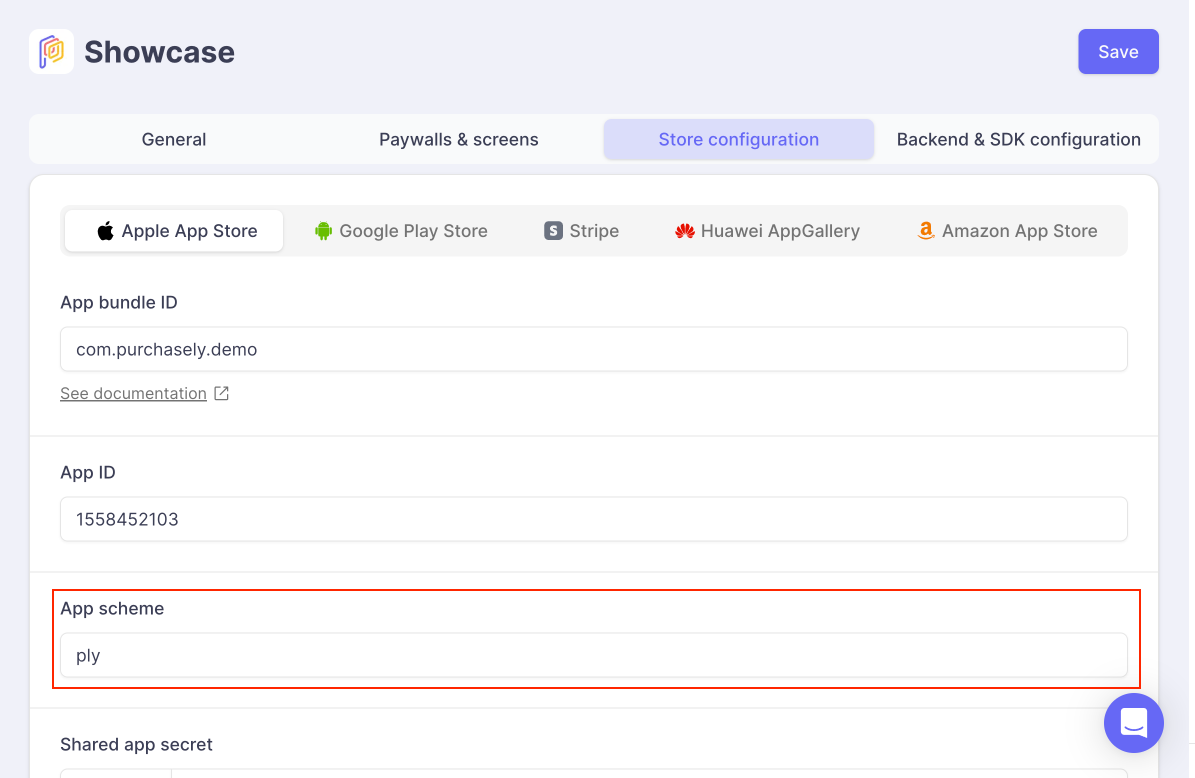
Universal links (eg: https://purchasely.io instead of ply in the above example) can also be used.
What are Purchasely deeplinks used for?
Purchasely supports the use of Deeplinks to trigger different actions to improve conversion, retention and upsell. You can send a Push or an email with that deeplink and Purchasely will open the requested presentation or page for you.
Here are the actions Purchasely supports:
- Display a paywall
- Display a placement
- Update credit card (deeplink to App Store or Play Store credit card information) - subscription apps only
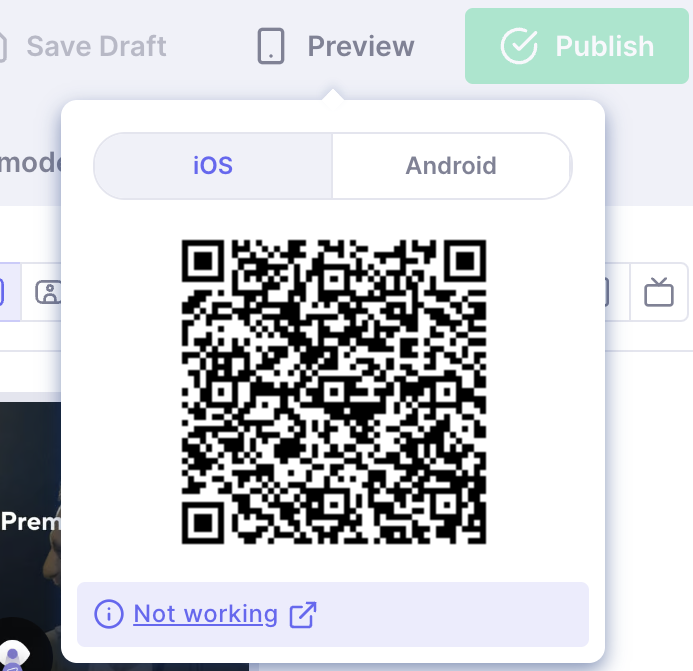
Deeplinks are also used to preview Screens on your device (directly inside your app) by scanning a QR code displayed in the upper right corner of the Screen Composer inside the Console.
Only a certain type of deeplinks, matching a specific pattern are recognized and handled by Purchasely.
Deeplinks which do not match the pattern are just ignored
Deeplink implementation
To manage deeplinks you need to do up to 2 things:
- Pass the deeplink to the Purchasely SDK when it is received by the application (not required on Android — see below)
- Optionally control when Purchasely is allowed to display content over your interface, for deeplinks and for campaigns
1. Passing the deeplink to Purchasely SDK
Android handles deeplinks automaticallySince v6, the Android SDK intercepts Purchasely deeplinks on its own (it reads the foreground activity's intent on create and resume). You don't need to call
handleDeeplinkyourself. The manual call below is only useful as a fallback for activities usingsingleTask/singleToplaunch modes that receive the deeplink inonNewIntentwithout callingsetIntent(intent).
To enable the Purchasely SDK to analyze the deeplink, the app provides it using the following code:
// ---------------------------------------------------
// If you are **NOT** using SceneDelegate
// ---------------------------------------------------

// AppDelegate.swift

import Purchasely

func application(_ application: UIApplication, open url: URL, sourceApplication: String?, annotation: Any) -> Bool {
	// You can chain calls to multiple handler using a OR
	return Purchasely.handleDeeplink(url)
}

// ---------------------------------------------------
// If you are using SceneDelegate
// ---------------------------------------------------

// SceneDelegate.swift

import Purchasely

func scene(_ scene: UIScene, willConnectTo session: UISceneSession, options connectionOptions: UIScene.ConnectionOptions) {

	// …

	if let url = connectionOptions.urlContexts.first?.url {
		_ = Purchasely.handleDeeplink(url)
	}
}

func scene(_ scene: UIScene, openURLContexts URLContexts: Set<UIOpenURLContext>) {
	if let url = URLContexts.first?.url {
		_ = Purchasely.handleDeeplink(url)
	}
}
class MyActivity : FragmentActivity() {
override fun onCreate(savedInstanceState: Bundle?) {
super.onCreate(savedInstanceState)
// Optional on Android: the SDK already intercepts deeplinks automatically.
// Keep this only as a fallback (e.g. singleTask/singleTop without setIntent()).
val data = intent.data
if (data != null) {
// Purchasely SDK returns true if it handles the deeplink
val isHandledByPurchasely = Purchasely.handleDeeplink(data)
}
}
}Purchasely.handleDeeplink('app://ply/presentations/')
.then((value) => console.log('Deeplink handled by Purchasely ? ' + value));Purchasely.handleDeeplink('app://ply/presentations/')
.then((value) => print('Deeplink handled by Purchasely ? $value'));// If you grab the deeplink inside your Cordova code you can call
Purchasely.handleDeeplink("app://ply/presentations/", (handled) => {
console.log("Was deeplink handled by Purchasely? " + handled);
});
Passing the deeplink at startWhen your app is launched from a deeplink (cold start), you can hand it to the SDK directly at initialization instead of waiting for the SDK to be ready. Every platform provides the method on the initialization chain, so no separate
handleDeeplinkcall is needed. The SDK resolves the link oncestartcompletes, with the configuration loaded and the user applied.// iOS Purchasely.apiKey("YOUR_API_KEY").handleDeeplink(url).start { error in }// Android Purchasely.Builder(context).handleDeeplink(intent.data).build().start { error -> }// React Native await Purchasely.builder('YOUR_API_KEY').handleDeeplink(url).stores(['google']).start();// Flutter await Purchasely.apiKey('YOUR_API_KEY').handleDeeplink(url).stores([PLYStore.google]).start();// Cordova — the builder method is deeplink(), not handleDeeplink() await Purchasely.builder('YOUR_API_KEY').deeplink(url).stores([Purchasely.Store.google]).start();A deeplink that reaches the SDK before the configuration settles is never lost. The SDK queues it and resolves it as soon as
startfinishes, whichever way your app handed it over. A Web2App redemption link never waits behind a queued paywall link: iOS puts it at the front of the queue, and Android hands it to the redemption intake out of band.
2. Forbidding the display
By default, Purchasely deeplinks are displayed immediately when they are received.
If your app has a launch routine that must complete before a screen can be shown (splash screen, onboarding, login, displaying an ad…), you can temporarily prevent Purchasely from displaying deeplinks, then re-enable it once you are ready:
// Prevent the display (e.g. while your onboarding is on screen)
Purchasely.allowDeeplink(false)

// Re-enable it once your app is ready — any queued deeplink displays immediately
Purchasely.allowDeeplink(true)
// Prevent the display (e.g. while your onboarding is on screen)
Purchasely.allowDeeplink = false
// Re-enable it once your app is ready — any queued deeplink displays immediately
Purchasely.allowDeeplink = truePurchasely.allowDeeplink(false);
// later
Purchasely.allowDeeplink(true);Purchasely.allowDeeplink(false);
// later
Purchasely.allowDeeplink(true);Purchasely.allowDeeplink(false);
// later
Purchasely.allowDeeplink(true);
You only need this if you want to defer deeplinks. If you do nothing, deeplinks display as soon as they are received.
3. Forbidding campaigns
Campaigns follow the same principle through their own flag, allowCampaigns, which is true by default (campaigns display immediately). To gate campaigns behind a launch flow, set it to false and flip it back to true when ready — any campaign queued meanwhile displays immediately:
Purchasely.allowCampaigns(false)
// later
Purchasely.allowCampaigns(true)
Purchasely.allowCampaigns = false
// later
Purchasely.allowCampaigns = truePurchasely.allowCampaigns(false);
// later
Purchasely.allowCampaigns(true);Purchasely.allowCampaigns(false);
// later
Purchasely.allowCampaigns(true);Purchasely.allowCampaigns(false);
// later
Purchasely.allowCampaigns(true);allowDeeplink and allowCampaigns are independent: gating one does not affect the other.
Can I control when deeplinks are displayed?
By default, Purchasely deeplinks are displayed immediately when they are received, so you do not have to do anything.
If your app has a launch routine that must complete before a screen can be shown (splash screen, onboarding, login…), you can temporarily prevent the display with Purchasely.allowDeeplink(false) and re-enable it with Purchasely.allowDeeplink(true) once your app is ready. Any deeplink received meanwhile is then displayed. See the method referred on the left.
A preview deeplink is an exception: it always displays immediately, and it bypasses Purchasely.allowDeeplink(false). Android does this in every 6.x build, and iOS does this from 6.1.0. An author who scans a QR code expects the Screen.
Supported deeplinks and override display
Updated 9 months ago