

Prerequisites & Flows Implementation
This page provides an overlook of prerequisites to leverage Flows and implementation details
Minimum SDK versionsFlows are supported since SDK v5.3, and this documentation describes the 6.0 display API.
On v5, the snippets on these pages differ: the presentation builder,
PLYPresentationOutcomeandgetFragment { outcome -> }are v6. See the v5 → v6 migration guides if you are still on 5.x.
Implementing Flows into your app
There are several ways to display a Flow inside of the app:
- Pre-fetching the Flow and using the
display()method - Manually integrating the Flow inside of your app (Android only)
- Using the Flow deeplink
Let's dig into each of them
1. Prefetching the Flow and using the display() method - recommended
display() method - recommendedIn the Purchasely Console, Flows can be associated with a Placement.
To display a Flow, the recommended method consists in pre-fetching it (more information on pre-fetching) and then showing it to the user using the display() method. This new method has been added along with the v5.3.0 of the SDK. The PLYPresentation object also contains properties related to a flow like flowId.
PLYPresentationBuilder.forPlacementId("onboarding").build().preload { presentation, error in
      guard error == nil,
            let presentation = presentation else { return }

     // Calling display() to launch the flow
		 // Source UIViewController is optional
     presentation.display(from: myUIViewController)
}

// If for some specific configuration you need to check if the presentation is a flow, that's possible but it should only be done if required by your implementation
if presentation.isFlow {
  // presentation is a flow
  presentation.display()
}
PLYPresentation {
  placementId("onboarding")
}.preload { presentation, error ->
  if(error != null) {
    Log.d("Purchasely", "Error fetching Screen", error)
    return@preload
  }

  // Calling display() to launch the flow
  presentation?.display(context)
}

// If for some specific configuration you need to check if the presentation is a flow, that's possible but it should only be done is required by your implementation
if (presentation.flowId != null) {
	// presentation is a flow
}
try {
const request = Purchasely.presentation.placement('onboarding').build();
// Preload resolves once the Screen is loaded
const presentation = await request.preload();
if (presentation.type === PLYPresentationType.DEACTIVATED) {
// No Screen to display
return;
}
if (presentation.type === PLYPresentationType.CLIENT) {
// Display my own Screen
return;
}
// Display Purchasely Screen; resolves at dismiss
await request.display();
} catch (e) {
console.error(e);
}try {
final request = PresentationBuilder.placement("onboarding").build();
// Preload resolves once the Screen is loaded
final presentation = await request.preload();
if (presentation.type == PresentationType.deactivated) {
// No Screen to display
return;
}
if (presentation.type == PresentationType.client) {
// Display my own Screen
return;
}
// Display Purchasely Screen; resolves at dismiss
await request.display(const Transition.modal());
} catch (e) {
print(e);
}Purchasely.fetchPresentationForPlacement(
'onboarding', //placementId
null, //contentId
(presentation) => {
Purchasely.presentPresentation(presentation, false, null,
(callback) => {
}, (error) => {
console.log("Error with present : " + error);
});
},
(error) => {
console.log("Error with purchase : " + error);
}
);The display() method automatically:
- Handles navigation inside the Flow (based on the transitions you configured in the Flow Composer)
- Applies the Flow’s Display Mode (modal, fullscreen, push, drawer, pop‑in)
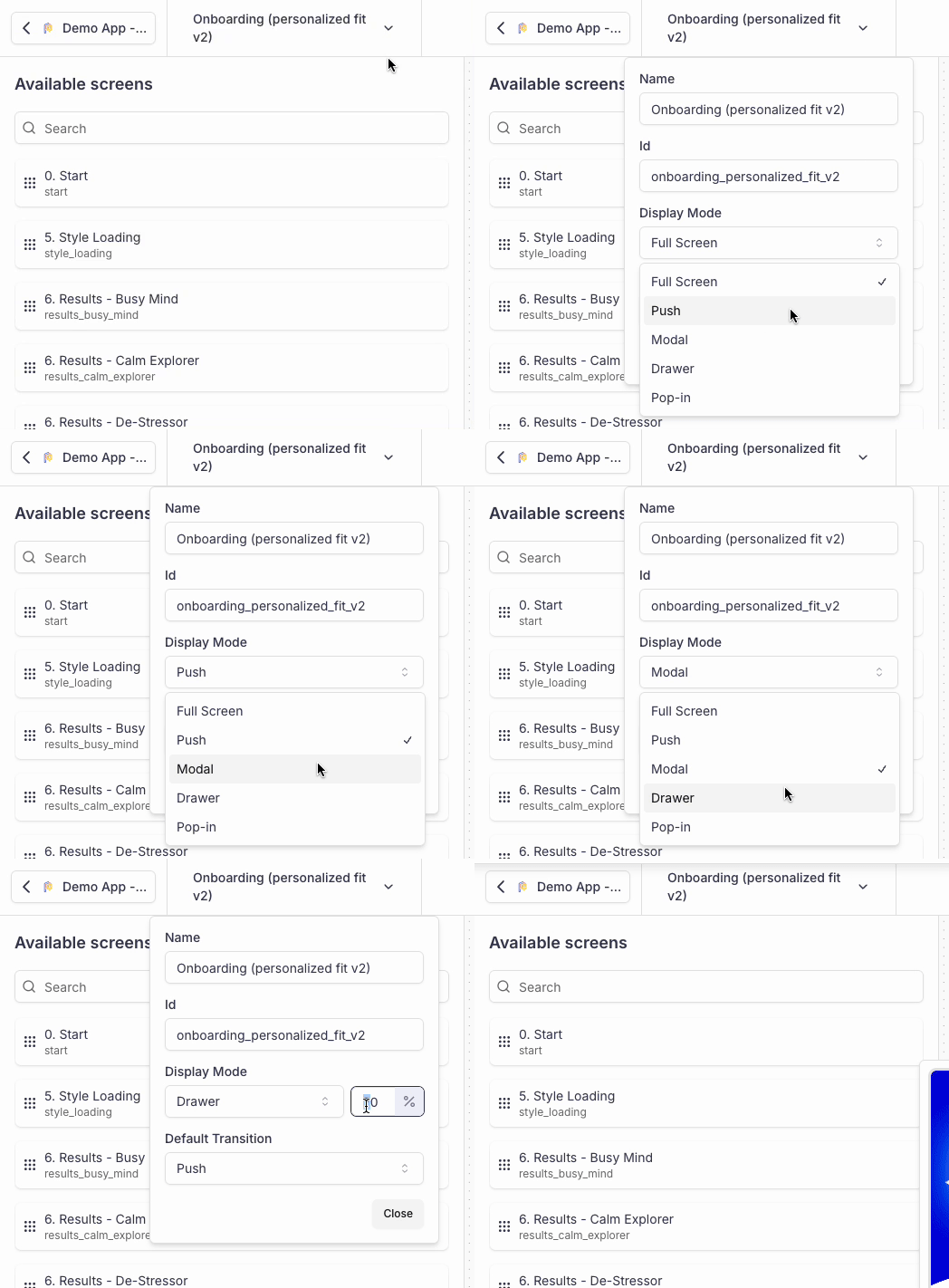
The display mode defines how the first Screen of the Flow should open
- Works uniformly across all screen types (paywalls, quizzes, landing pages, etc.)
Push display mode requires a navigation bar in the parent viewThe Display mode
Pushonly works if the parent view already contains a navigation bar.If you try to display a Screen/Flow associated with the
Pushdisplay mode from a parent view which doesn't have a navigation bar associated, the display() method will fallback on the default display mode:
- Modal on iOS
- Full Screen on Android
2. Manually integrating the Flow inside of your app (Only on Android)
If you want to integrate the Flow manually into your app / parent view, you should check the attribute displayMode carried by the PLYPresentation returned by the pre-fetching.
PLYPresentation {
  placementId("onboarding")
}.preload { presentation, error ->
  error?.let {
    Toast.makeText(context, "Error fetching presentation", Toast.LENGTH_SHORT).show()
    return@preload
  }

  presentation?.let {
    // In v6 the callback delivers a single PLYPresentationOutcome
    val fragment = it.getFragment { outcome ->
      when (outcome.purchaseResult) {
        PLYPurchaseResult.PURCHASED -> Log.d("Purchasely", "User purchased ${outcome.plan?.name}")
        PLYPurchaseResult.RESTORED  -> Log.d("Purchasely", "User restored ${outcome.plan?.name}")
        PLYPurchaseResult.CANCELLED,
        null -> Log.d("Purchasely", "Dismissed: ${outcome.closeReason}")
      }
    }

    when (it.displayMode?.type) {
      PLYTransitionType.PUSH -> {
        // Handle push transition
        Log.d("Purchasely", "Display it as a push transition")
      }
      PLYTransitionType.FULLSCREEN -> {
        // Handle fullscreen transition
        Log.d("Purchasely", "Display it as a fullscreen transition")
      }
      PLYTransitionType.MODAL -> {
        // Handle modal transition
        Log.d("Purchasely", "Display it as a modal transition")
      }
      PLYTransitionType.DRAWER -> {
        // Handle drawer transition
        val height = it.displayMode?.height
        Log.d("Purchasely", "Display it as a drawer transition with height: $height")
      }
      PLYTransitionType.POPIN -> {
        // Handle pop-in transition
        val width = it.displayMode?.width
        val height = it.displayMode?.height
        Log.d("Purchasely", "Display it as a pop-in transition with width: $width and height: $height")
      }
      null -> {
        // Handle no transition
      }
    }
  } ?: run {
    Toast.makeText(context, "Presentation is null", Toast.LENGTH_SHORT).show()
    return@preload
  }
}
displayModeon Android,transitionon iOSThe property carrying the transition is named
displayModeon Android (of typePLYTransition?) and was renamed totransitionon iOS in v6 (PLYDisplayMode/PLYDisplayModeTypebecamePLYTransition/PLYTransitionType, with no compatibility aliases).Since v6, the
widthandheightof aPLYTransitionarePLYTransitionDimensionvalues — eitherPLYDimensionType.PIXEL(in dp) orPERCENTAGE(a0.0–1.0ratio). The formerheightPercentageis deprecated but still read as a fallback. Defaults are unchanged: drawer 60%, pop-in 50% height.
3. Using the Flow deeplink
To use this method, you need to have implemented Deeplink management
You can trigger the display of a Flow using its deeplink, the SDK will automatically display it.
You can also display the Flow yourself by implementing the UIHandler
Quick example:
extension myClass: PLYUIHandler {
    // In v6, PLYPresentation is a protocol — the parameter is `any PLYPresentation`
    func display(presentation: any PLYPresentation, from sourceController: UIViewController?, proceed: @escaping () -> ()) {
      presentation.display(from: nil)
    }
}
Purchasely.uiHandler = object : PLYUIHandler {
override fun onPresentation(presentation: PLYPresentation, proceed: () -> Unit) {
// Display the flow
presentation.display(context)
}
}
In this case, the Display mode is automatically taken into consideration by the SDK if you call the method display.
Otherwise, you need to retrieve the display mode from the presentation object to display it accordingly.
Learn more in our dedicated section about the UIHandler
Updated 3 months ago
What’s Next
In the next section, we guide you with the configuration of a Flow