

Custom Audiences API
Sync user custom audiences from your CRM, CDP, or any third-party tool to Purchasely using the Client API
Before you start — how to integrate the Custom Audiences APICustom Audiences rely on a Purchasely API, that needs to be implemented somewhere. There are three possible paths:
- By your CDP / CRM vendor — so the integration is available natively in the tool you already use. Some vendors can leverage their existing "Custom Integration" capability; others will require dedicated development on their side.
- By you directly — typically when you use an in-house CDP / CRM, or when you prefer to keep control of the sync logic.
- Via a middleware (fallback) — a small service you build that pulls segments from your CDP / CRM and pushes them to the Purchasely API. More effort, but works when neither of the options above is possible.
Recommended steps if you want to enable Custom Audiences:
- Contact us so we can enable the feature on your account and sign a contract amendment. A temporary access for evaluation purposes (no production use) can be arranged.
- Reach out to your CDP / CRM vendor and ask them to add a Purchasely integration.
- Introduce us to your vendor — we'll provide implementation support directly.
Existing integrations:
- ✅ Dinmo — native integration available (setup guide)
- ✅ Amplitude
- ✅ Mixpanel
Benefits
Custom Audiences let you inject user segments built in your CRM (e.g. Braze, Iterable) or CDP (e.g. Segment, Amplitude) directly into Purchasely. This means you can leverage the rich behavioral data and segmentation capabilities of your existing marketing stack to target users with personalized In-App Experiences — paywalls, upgrade prompts, retention offers, and more — without having to recreate those segments in Purchasely.
For example, you could push a "high-intent trial users" segment from your CDP and immediately use it in Purchasely to show them a tailored conversion screen, or target a "churning subscribers" cohort from your CRM with a specific retention campaign.
Custom Audiences API
The Custom Audiences API allows you to create and manage User Custom Audiences in Purchasely programmatically.
Once synced, Custom Audiences can be used in Placements, Campaigns, Flows, A/B tests just like Audiences, allowing you to display different Screens to specific groups of users.
Custom Audiences vs AudiencesAudiences are dynamic: they are defined by combining user attribute conditions (e.g. "iOS users in the US with an active subscription"). Membership is evaluated in real-time.
Custom Audiences are static: they are explicit lists of user identifiers that you push to Purchasely via the API. Membership is determined by the list you provide.
Prerequisites
Feature access
The Custom Audiences feature requires the custom-audiences permission to be enabled on your Purchasely account. Without it, all Custom Audiences API endpoints will return 403 FEATURE_NOT_ENABLED.
Contact your Purchasely account manager or support to get the pricing and access.
API Key
All Client API requests require a Bearer token for authentication. You can create and manage API keys from the Purchasely Console:
- Navigate to Settings > Client API Keys in your app
- Click Create API Key and give it a name
- Copy the token — it will only be displayed once
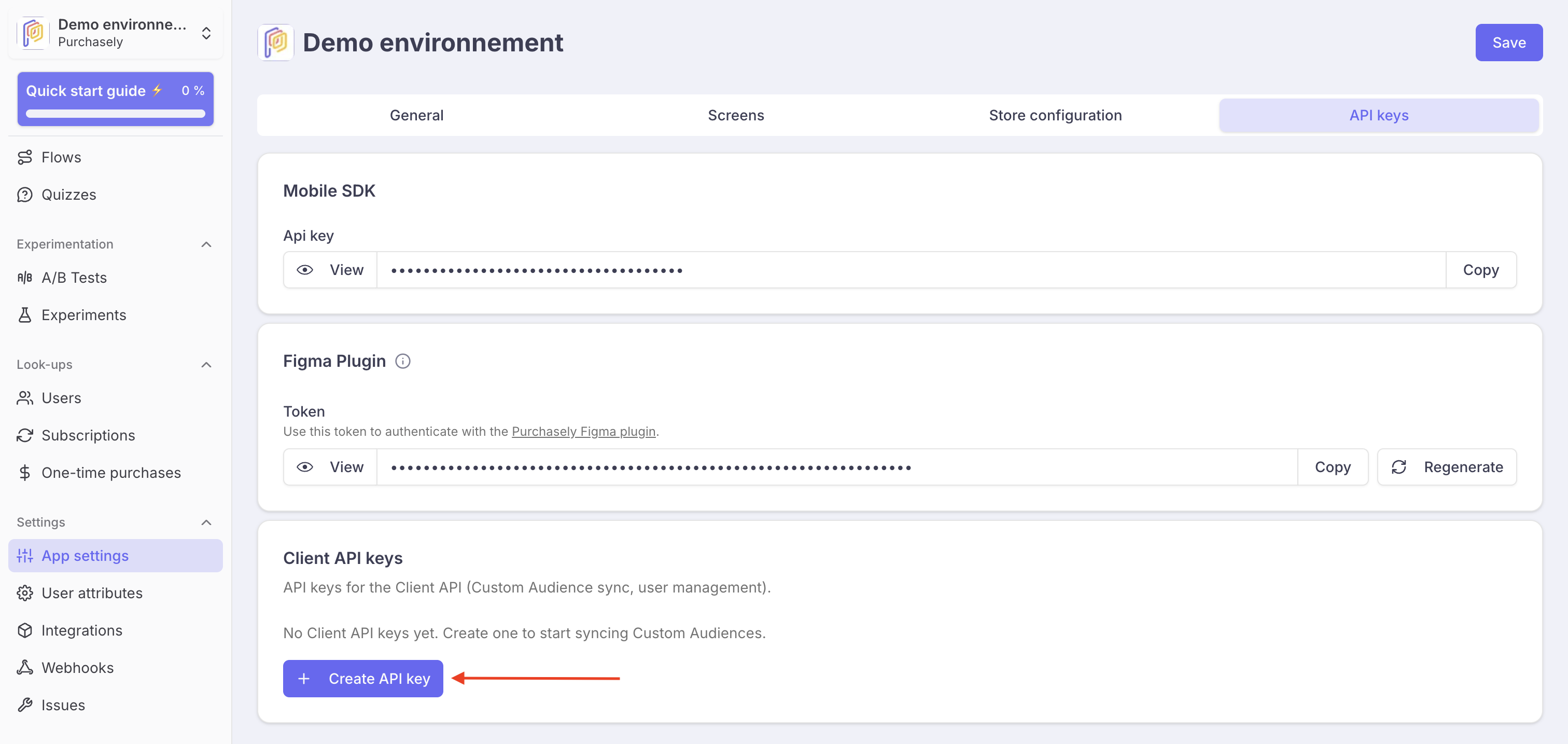
Include the token in the Authorization header of every request:
Authorization: Bearer YOUR_API_KEY
Keep your API key secretThe API key grants full access to your app's Client API. Never expose it in client-side code or public repositories.
Implementation
Base URL
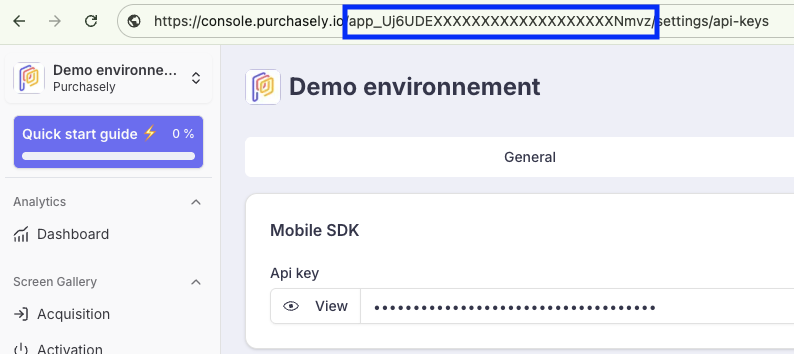
https://api.purchasely.io/client/mobile_applications/{app_id}Replace {app_id} with your application's Purchasely ID (e.g. app_xxxx). You can fetch it directly from the browser URL when you open the Purchasely Console
Rate limits
The Client API enforces a rate limit of 60 requests per minute per API key. Requests exceeding this limit will receive a 429 Too Many Requests response.
Additionally, the Replace all users endpoint (PUT .../users/replace) is limited to 1 call per custom audience every 12 hours. Use the incremental add/remove endpoint for frequent updates.
The maximum request body size is 10 MB.
Managing Custom Audiences
Create a custom audience
Creates a new custom audience for your application.
POST /client/mobile_applications/{app_id}/custom_audiencesRequest body:
{
  "custom_audience": {
    "vendor_id": "premium_users",
    "name": "Premium Users",
    "identifier_type": "user_id"
  }
}| Parameter | Type | Required | Description |
|---|---|---|---|
vendor_id | string | Yes | Your unique identifier for this Custom Audience |
name | string | Yes | A human readable name for the Custom Audience. It will only be displayed in the Purchasely Console. |
identifier_type | string | No | The type of user identifier. One of: user_id, anonymous_id. Defaults to user_id |
Response 201 Created:
{
  "custom_audience": {
    "id": "caud_xxxx",
    "vendor_id": "premium_users",
    "name": "Premium Users",
    "identifier_type": "user_id",
    "user_count": 0,
    "status": "ready",
    "last_synced_at": null,
    "last_job_result": null,
    "created_at": "2026-03-13T12:00:00.000Z",
    "updated_at": "2026-03-13T12:00:00.000Z"
  }
}
List custom audiences
Returns all active custom audiences for your application.
GET /client/mobile_applications/{app_id}/custom_audiences| Parameter | Type | Required | Description |
|---|---|---|---|
page | integer | No | Page number for pagination (25 items per page) |
Response 200 OK:
{
  "custom_audiences": [
    {
      "id": "caud_xxxx",
      "vendor_id": "premium_users",
      "name": "Premium Users",
      "identifier_type": "user_id",
      "user_count": 15420,
      "status": "ready",
      "last_synced_at": "2026-03-13T12:30:00.000Z",
      "last_job_result": {
        "processed_count": 15420,
        "skipped_count": 3,
        "error_count": 0
      },
      "created_at": "2026-03-13T12:00:00.000Z",
      "updated_at": "2026-03-13T12:30:00.000Z"
    }
  ]
}
Get a custom audience
Returns a single Custom Audience by its vendor_id.
GET /client/mobile_applications/{app_id}/custom_audiences/{vendor_id}Response 200 OK:
{
  "custom_audience": {
    "id": "caud_xxxx",
    "vendor_id": "premium_users",
    "name": "Premium Users",
    "identifier_type": "user_id",
    "user_count": 15420,
    "status": "ready",
    "last_synced_at": "2026-03-13T12:30:00.000Z",
    "last_job_result": null,
    "created_at": "2026-03-13T12:00:00.000Z",
    "updated_at": "2026-03-13T12:30:00.000Z"
  }
}
Delete a custom audience
Archives a custom audience. The Custom Audience will no longer appear in the list but its data is retained.
DELETE /client/mobile_applications/{app_id}/custom_audiences/{vendor_id}Response 200 OK:
{
  "custom_audience": {
    "id": "caud_xxxx",
    "vendor_id": "premium_users",
    "name": "Premium Users",
    "identifier_type": "user_id",
    "user_count": 15420,
    "status": "ready",
    "last_synced_at": "2026-03-13T12:30:00.000Z",
    "last_job_result": null,
    "created_at": "2026-03-13T12:00:00.000Z",
    "updated_at": "2026-03-13T12:30:00.000Z"
  }
}
Cannot delete while processingIf a mutation is currently processing for this Custom Audience, the deletion will be rejected with a
409 Conflicterror. Wait for the mutation to complete before retrying.
Managing Custom Audience Users
All user mutation operations are asynchronous. They return 202 Accepted immediately and process in the background. The Custom Audience's status field transitions to "processing" while the mutation is running, then back to "ready" (or "failed") when complete.
One mutation at a timeOnly one mutation can run at a time per custom audience. If you attempt to start a mutation while one is already processing, the API will respond with a
409 Conflicterror.
Add and remove users
Add and/or remove users from a custom audience in a single request.
POST /client/mobile_applications/{app_id}/custom_audiences/{vendor_id}/usersRequest body:
{
  "add": ["user_001", "user_002", "user_003"],
  "remove": ["user_004", "user_005"]
}| Parameter | Type | Required | Description |
|---|---|---|---|
add | array of strings | No* | User identifiers to add to the custom audience |
remove | array of strings | No* | User identifiers to remove from the custom audience |
- At least one of
addorremovemust be provided.
Response 202 Accepted:
{
  "custom_audience": {
    "id": "caud_xxxx",
    "vendor_id": "premium_users",
    "status": "processing",
    "..."
  }
}
Replace all users
Replaces the entire custom audience membership with the provided list. All existing users are removed and the new list is set.
PUT /client/mobile_applications/{app_id}/custom_audiences/{vendor_id}/users/replaceRequest body:
{
  "users": ["user_001", "user_002", "user_003"]
}| Parameter | Type | Required | Description |
|---|---|---|---|
users | array of strings | Yes | The complete list of user identifiers for the custom audience |
Response 202 Accepted
Rate limitThis endpoint is limited to 1 call per custom audience every 12 hours. For frequent updates, use the incremental Add and remove users endpoint instead.
Clear all users
Removes all users from the custom audience.
DELETE /client/mobile_applications/{app_id}/custom_audiences/{vendor_id}/users/clearResponse 202 Accepted
List users
Returns the list of user identifiers currently in the custom audience, with cursor-based pagination.
GET /client/mobile_applications/{app_id}/custom_audiences/{vendor_id}/users| Parameter | Type | Required | Description |
|---|---|---|---|
cursor | string | No | Pagination cursor returned by the previous response |
limit | integer | No | Number of results per page (1–10,000, default: 1,000) |
Response 200 OK:
{
  "users": ["user_001", "user_002", "user_003"],
  "next_cursor": "user_003",
  "has_more": true,
  "warning": null
}
Listing users while processingIf the custom audience is currently processing a mutation, the
usersarray will be empty and awarningmessage will be returned:"Custom audience is currently being updated".
Custom audience status
The status field on a custom audience indicates its current state:
| Status | Description |
|---|---|
ready | The custom audience is idle and ready for mutations |
processing | A mutation is currently being processed |
failed | The last mutation failed — check last_job_result for details |
After a successful mutation, last_synced_at is updated and last_job_result contains a summary:
{
  "processed_count": 15420,
  "skipped_count": 3,
  "error_count": 0
}
Skipped users are those with invalid identifiers (empty, too long, or containing control characters).
Error handling
All errors follow this format:
{
  "error": {
    "code": "ERROR_CODE",
    "messages": ["Human-readable description"]
  }
}| HTTP Status | Code | Description |
|---|---|---|
401 | UNAUTHORIZED | Missing or invalid API key |
403 | FORBIDDEN | API key does not have access to this application |
403 | FEATURE_NOT_ENABLED | Custom audiences feature is not enabled for this account |
404 | CUSTOM_AUDIENCE_NOT_FOUND | No custom audience found with this vendor_id |
409 | MUTATION_IN_PROGRESS | A mutation is already running for this custom audience |
409 | CANNOT_ARCHIVE_WHILE_PROCESSING | Cannot delete a custom audience while a mutation is processing |
413 | PAYLOAD_TOO_LARGE | Request body exceeds 10 MB |
422 | VALIDATION_FAILED | Missing or invalid required fields |
422 | EMPTY_PAYLOAD | No users provided in the mutation request |
422 | INVALID_PAYLOAD | add, remove, or users must be arrays of strings |
429 | - | Rate limit exceeded (60 requests/minute, or 1/12h for replace) |
Example: full sync workflow
Here is a typical workflow to sync a custom audience from an external tool:
# 1. Create the custom audience
curl -X POST https://api.purchasely.io/client/mobile_applications/app_xxxx/custom_audiences \
  -H "Authorization: Bearer YOUR_API_KEY" \
  -H "Content-Type: application/json" \
  -d '{
    "custom_audience": {
      "vendor_id": "braze_high_value",
      "name": "High-Value Users (Braze)",
      "identifier_type": "user_id"
    }
  }'

# 2. Populate the custom audience with users
curl -X PUT https://api.purchasely.io/client/mobile_applications/app_xxxx/custom_audiences/braze_high_value/users/replace \
  -H "Authorization: Bearer YOUR_API_KEY" \
  -H "Content-Type: application/json" \
  -d '{
    "users": ["uid_001", "uid_002", "uid_003"]
  }'

# 3. Check the custom audience status
curl https://api.purchasely.io/client/mobile_applications/app_xxxx/custom_audiences/braze_high_value \
  -H "Authorization: Bearer YOUR_API_KEY"

# 4. Later, incrementally update
curl -X POST https://api.purchasely.io/client/mobile_applications/app_xxxx/custom_audiences/braze_high_value/users \
  -H "Authorization: Bearer YOUR_API_KEY" \
  -H "Content-Type: application/json" \
  -d '{
    "add": ["uid_004"],
    "remove": ["uid_001"]
  }'
Once your custom audience is synced, you can associate it with a Placement in the Purchasely Console to display a specific screen to users in that custom audience.
Cache
Once a Custom Audience has been processed, it can take up to 15 min to update the cache for the app. For testing purposes, Purchasely Console Users using the debug mode have a 30s latency instead.
Updated 3 months ago