

Intercept Screens Actions with the Action Interceptor
This section provides a details overview of the Action Interceptor and how to intercept actions
What is the Action Interceptor?
The Action Interceptor allows to intercept and override every interaction the users have with a Purchasely Screen.
This can be used to:
- Intercept purchase and restore actions to perform them using your own code or another third-party SDK
- Intercept the login button tapped to display your login form
- Force the explicit acceptance of terms and conditions before a purchase
- Intercept the call to a webview to inject credentials and be directly logged in
- Block purchases in Kids category apps to add a parental permission gate
- Block direct access to external content (webview or link to Safari) in Kids category apps to add a parental permission gate
With the action interceptor, you get everything you need to:
- Get the action (purchase, login, ...) and context (Plan purchased for instance)
- Display views, errors, messages, … above the Purchasely Screens
- Choose if Purchasely should continue the action or not
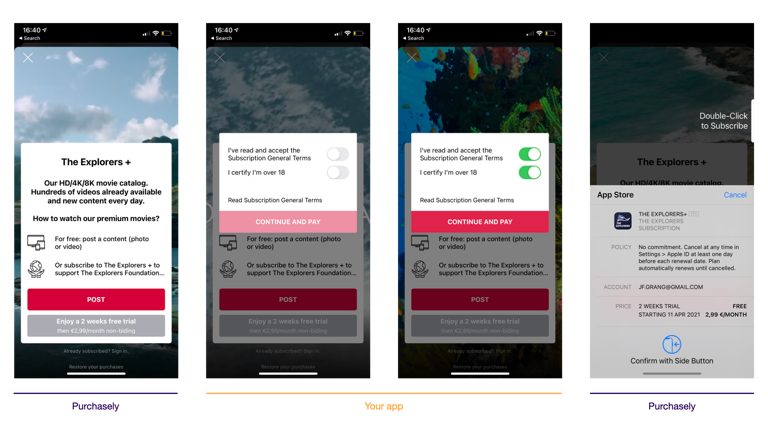
Example of use of the Action Interceptor: when a user clicks on the Purchase button, the SDK hands over to the app that displays a modal to make the user accept the T&C. The same principle is used to make the app process the transaction with an already-in-place transaction infrastructure
What Paywall Actions can be intercepted?
You can intercept the following buttons being tapped:
- Close
- Login
- Navigate (web or deeplink)
- Purchase
- Win-back / retention offer
- Restore
- Open Screen
- Open Placement
- Promo code
Overriding the open_presentation or open_placement actions is not recommended.
These actions are tightly coupled with Purchasely’s internal context. Overriding them can break the SDK’s ability to properly track A/B tests, audiences, and campaigns, leading to incorrect analytics and unexpected behavior.
Such overrides should only be considered for very specific and advanced use cases. Before implementing them, please discuss your use case with Purchasely to ensure it does not negatively impact tracking, experimentation, or campaign attribution.
Responding to an action: SUCCESS, FAILED, NOT_HANDLED
SUCCESS, FAILED, NOT_HANDLEDEvery interceptor must return a result telling the SDK how your app handled the action. The SDK relies on this value to decide what to do next — perform the action itself, stop, or move on to the next action. There are three possible results:
| Result | iOS (Swift) | Android (Kotlin) | React Native | Flutter | What the SDK does |
|---|---|---|---|---|---|
SUCCESS | completion(.success) | PLYInterceptResult.SUCCESS | return 'success' | PLYInterceptResult.success | Your app handled the action. The SDK marks it done and moves on to the next action in the chain. For purchase / restore in observer mode, the SDK also synchronizes the transaction automatically — no synchronize() call needed. |
FAILED | completion(.failed) | PLYInterceptResult.FAILED | return 'failed' | PLYInterceptResult.failed | Your app tried but failed. The SDK stops the chain (e.g. it won't open a screen after a failed purchase) and the button stops its loading state. |
NOT_HANDLED | completion(.notHandled) | PLYInterceptResult.NOT_HANDLED | return 'notHandled' | PLYInterceptResult.notHandled | Your app declines to handle this occurrence. The SDK performs the default action itself (triggers the native purchase flow, opens the login screen, navigates…). Exception: in observer mode Purchasely never processes purchase / restore, so NOT_HANDLED on those does nothing. |
You only register the actions you want to overrideAny action for which you did not register an interceptor is performed by the SDK as usual — so a button never stays stuck spinning. You don't need to return
NOT_HANDLEDfor actions you aren't interested in.
CordovaCordova exposes the same three results as
Purchasely.InterceptResult.success/.failed/.notHandled. Return one of them from yourinterceptActionhandler — there is no separate "process action" step.
synchronize()is only needed outside the interceptorIn
observermode, returningSUCCESSonpurchase/restorealready triggers synchronization. CallPurchasely.synchronize()yourself only for transactions completed outside the paywall action interceptor — for example a purchase made in your own store screen or BYOS. See observer — using the Action Interceptor.
Chaining several actions on one component
In the Screen Composer, a single component (a button, for instance) can be configured with more than one action — for example a purchase followed by an open_screen. The SDK runs the actions in order, one after the other, and only moves to the next action if the previous one succeeded:
- If an action returns
SUCCESS(or you returnNOT_HANDLEDand the SDK's own handling succeeds), the SDK runs the next action. - If an action returns
FAILED(or the SDK's own handling fails), the remaining actions are skipped.
Example — a paywall button configured with purchase, then open_screen:
- the user taps the button → the
purchaseaction runs; - if the purchase completes successfully, the SDK moves on and runs
open_screen(e.g. a "thank you" or onboarding screen); - if the purchase fails or is cancelled,
open_screenis not executed.
This is exactly why returning the right result matters: returning SUCCESS too early would open the follow-up screen even though nothing was purchased, while returning FAILED / NOT_HANDLED by mistake would break the chain.
Intercepting an action
Here is a sample code to show how to intercept a login or to make the user accept terms & conditions before proceeding to the purchase.
Note: This mechanism can also be used in full mode.
// Intercept the tap on login
Purchasely.interceptAction(.login) { [weak self] info, params, completion in
    // When the user has completed the process
    // Return .notHandled to reload the paywall if user is logged in
    self?.presentLogin(above: info?.controller) { (loggedIn) in
        Purchasely.userLogin(with: "MY_USER_ID")
        completion(loggedIn ? .notHandled : .success)
    }
}

// Intercept the tap on purchase to display the terms and condition
Purchasely.interceptAction(.purchase) { [weak self] info, params, completion in
    self?.presentTermsAndConditions(above: info?.controller) { (userAcceptedTerms) in
        completion(userAcceptedTerms ? .notHandled : .success)
    }
}
Purchasely.interceptAction<PLYPresentationAction.Purchase> { info, purchase ->
if (info?.activity == null) return@interceptAction PLYInterceptResult.NOT_HANDLED
presentTermsAndConditions(info.activity) { userAcceptedTerms ->
// Display your terms & conditions, then proceed
}
PLYInterceptResult.NOT_HANDLED
}
Purchasely.interceptAction<PLYPresentationAction.Login> { info, _ ->
if (info?.activity == null) return@interceptAction PLYInterceptResult.NOT_HANDLED
// Call your method to display your view
presentLogin(info.activity) { userLoggedIn ->
Purchasely.userLogin("MY_USER_ID")
}
PLYInterceptResult.NOT_HANDLED
}
// The interceptAction<T> { … } lambda above is a suspend lambda: you RETURN the result.
// If your call site is not a coroutine, use the Class-based overload (::class.java) and
// return the result later via the `result` lambda — call it exactly once:
Purchasely.interceptAction(PLYPresentationAction.Login::class.java) { info, action, result ->
if (info?.activity == null) return@interceptAction result(PLYInterceptResult.NOT_HANDLED)
presentLogin(info.activity) { userLoggedIn ->
Purchasely.userLogin("MY_USER_ID")
result(PLYInterceptResult.SUCCESS)
}
}import { Linking } from 'react-native';
// Register one handler per action kind.
// Return 'success' | 'failed' | 'notHandled'.
Purchasely.interceptAction('navigate', async (info, payload) => {
console.log('User wants to navigate');
if (payload?.kind === 'navigate') {
Linking.openURL(payload.url);
return 'success';
}
return 'notHandled';
});
Purchasely.interceptAction('close', async (info, payload) => {
console.log('User wants to close paywall');
return 'notHandled';
});
Purchasely.interceptAction('login', async (info, payload) => {
console.log('User wants to login');
// Present your own screen for user to log in
Purchasely.userLogin('MY_USER_ID');
// Return success to update Purchasely Paywall
return 'success';
});
Purchasely.interceptAction('openPresentation', async (info, payload) => {
console.log('User wants to open a new paywall');
return 'notHandled';
});
Purchasely.interceptAction('purchase', async (info, payload) => {
console.log('User wants to purchase');
// If you want to intercept it, handle the purchase and display your screen
return 'success';
});
Purchasely.interceptAction('restore', async (info, payload) => {
console.log('User wants to restore his purchases');
return 'notHandled';
});await Purchasely.interceptAction(
PLYPresentationActionKind.navigate,
(info, payload) async {
print('User wants to navigate');
return PLYInterceptResult.notHandled;
},
);
await Purchasely.interceptAction(
PLYPresentationActionKind.close,
(info, payload) async {
print('User wants to close paywall');
return PLYInterceptResult.success;
},
);
await Purchasely.interceptAction(
PLYPresentationActionKind.login,
(info, payload) async {
print('User wants to login');
//Present your own screen for user to log in
Purchasely.userLogin('MY_USER_ID');
return PLYInterceptResult.success;
},
);
await Purchasely.interceptAction(
PLYPresentationActionKind.openPresentation,
(info, payload) async {
print('User wants to open a new paywall');
return PLYInterceptResult.notHandled;
},
);
await Purchasely.interceptAction(
PLYPresentationActionKind.purchase,
(info, payload) async {
print('User wants to purchase');
//If you want to intercept it, handle the purchase and display your screen
return PLYInterceptResult.success;
},
);
await Purchasely.interceptAction(
PLYPresentationActionKind.restore,
(info, payload) async {
print('User wants to restore his purchases');
return PLYInterceptResult.notHandled;
},
);// Register one handler per action kind; each returns a Purchasely.InterceptResult.
Purchasely.interceptAction(Purchasely.PresentationAction.navigate, (info, parameters) => {
console.log('User wants to navigate');
return Purchasely.InterceptResult.notHandled;
});
Purchasely.interceptAction(Purchasely.PresentationAction.close, (info, parameters) => {
console.log('User wants to close paywall');
return Purchasely.InterceptResult.notHandled;
});
Purchasely.interceptAction(Purchasely.PresentationAction.login, (info, parameters) => {
console.log('User wants to login');
// Present your own screen for the user to log in
Purchasely.closePresentation();
Purchasely.userLogin('MY_USER_ID');
// Return success to refresh the Purchasely paywall
return Purchasely.InterceptResult.success;
});
Purchasely.interceptAction(Purchasely.PresentationAction.open_presentation, (info, parameters) => {
console.log('User wants to open a new paywall');
return Purchasely.InterceptResult.notHandled;
});
Purchasely.interceptAction(Purchasely.PresentationAction.purchase, (info, parameters) => {
console.log('User wants to purchase');
// Return notHandled to let the SDK run the purchase, or handle it yourself and return success
return Purchasely.InterceptResult.notHandled;
});
Purchasely.interceptAction(Purchasely.PresentationAction.restore, (info, parameters) => {
console.log('User wants to restore his purchases');
return Purchasely.InterceptResult.notHandled;
});Intercepting the purchase action
Using the Action Interceptor to process transactions in observerMode
Updated 3 months ago
What’s Next
If you need to use the Action Interceptor to process transactions with your own subscription infrastructure